

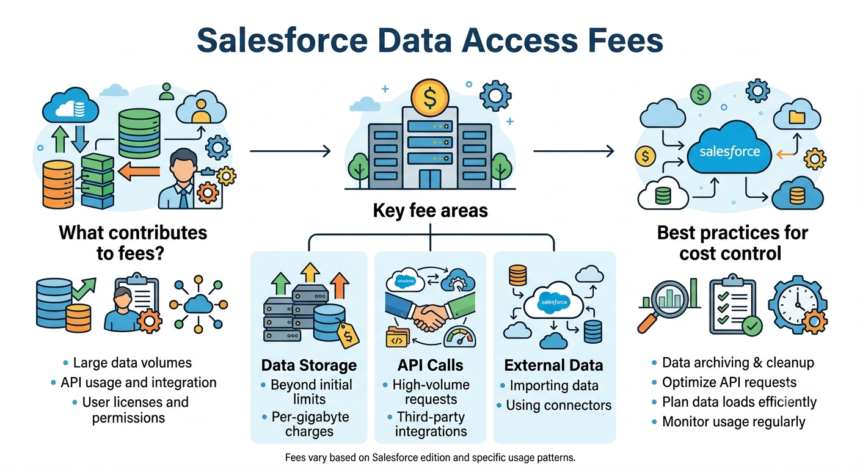

I started this piece the way I start most of them, by trying to download something. Not a movie. Not a song. A CSV of my own contact records, sitting inside a Salesforce Professional org I was helping a small nonprofit client untangle. I clicked Export. I waited. I got a message telling me the export was ready once a month, and only once a month, unless somebody upgraded to Enterprise. Fair enough, I thought. Storage costs money. Compute costs money. Then I read further and found the 48-hour countdown on the download link, and the 60-second wait between files if you had more than one, and I understood that I had wandered into a small, well-designed toll booth. The data was mine. The road to get it was not.
This is a story about that road. It is not a story about Salesforce being uniquely villainous, because it is not. It is the story of a company that built the dominant customer relationship platform on earth, priced access to that platform in careful layers, and discovered along the way that the most valuable layer to gate was not a feature. It was the exit.
The Tier Wall
Start with the plain mechanics, because the plain mechanics tell you almost everything. Salesforce’s1 own help documentation lays out the rule without apology: weekly data exports are available in Enterprise, Performance, and Unlimited Editions. Everyone below that, which includes Professional and Developer Edition, gets a full export once every 29 days.
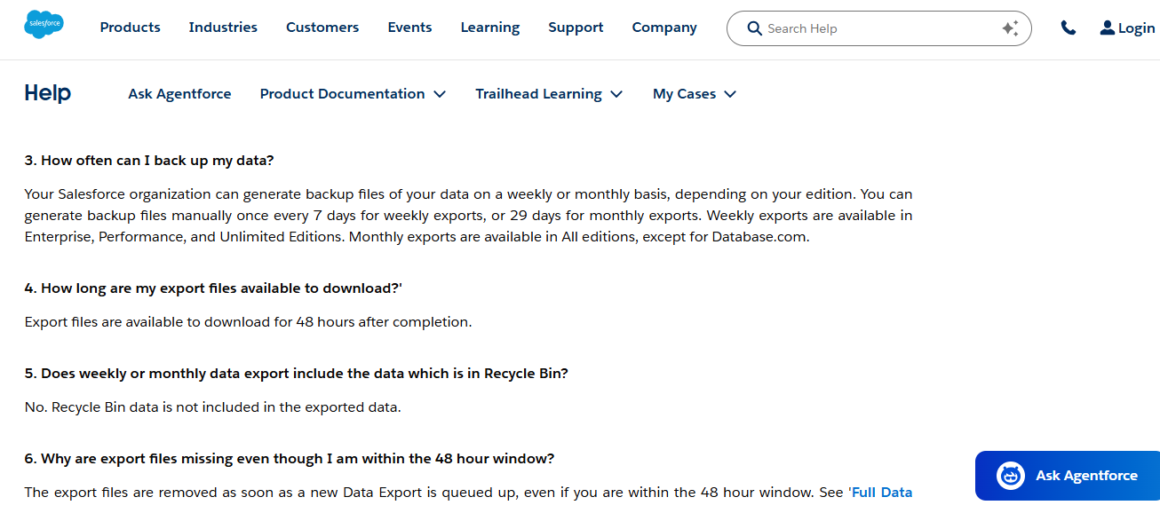
Sit with that for a second. A company on Professional edition, which is a real tier that real small and mid-sized businesses pay for, has one shot a month to pull a clean copy of its own records. Delete something by accident on day two of the cycle and notice on day fifteen, and there is no native undo. The backup vendor Gearset puts the risk in its own careful language, warning customers to weigh whether a month of potential data loss counts as an acceptable recovery point objective for their business. That is a diplomatic way of saying you might just lose a month of work.
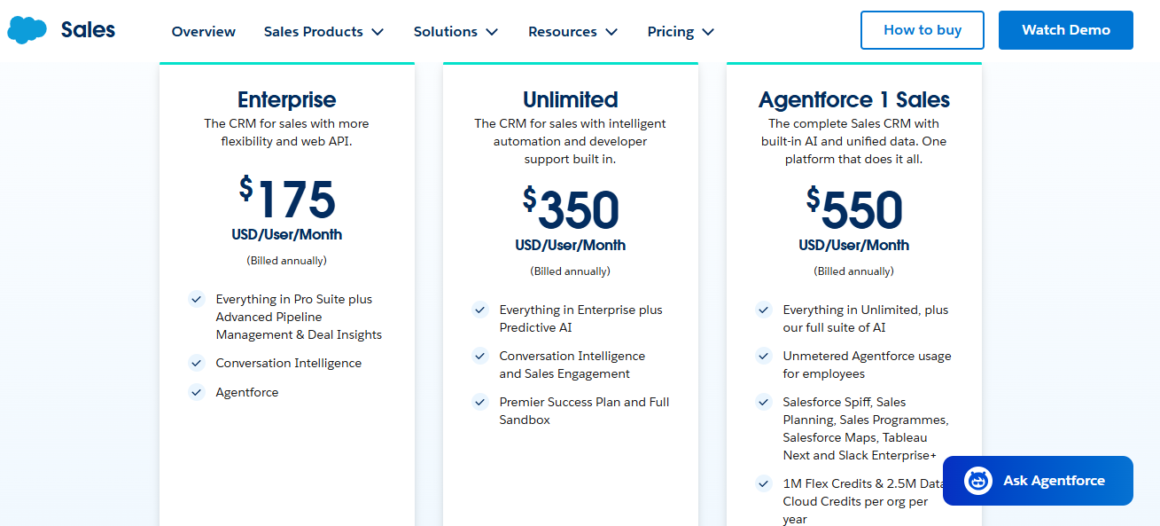
The fix is to upgrade. Salesforce’s published pricing2 puts Enterprise edition at roughly $175 per user per month, billed annually, which works out to $2,100 a year per seat before support plans or storage. For a 50-person sales team, that is past six figures a year, and a meaningful chunk of what you are buying is the right to see your own data on a weekly instead of monthly cycle.
Even once you have that right, Salesforce does not make collecting the file pleasant. The export arrives as a set of zipped CSV files, and you have exactly 48 hours to grab them before the link expires. If your org is large, the export splits into multiple archives capped at 512MB each, and starting this past release cycle, Salesforce added a new wrinkle. According to backup vendor Odaseva3, the Winter ’26 release enforces sequential downloading: one file at a time, with roughly a 60-second wait before the next one, and an HTTP 429 “Too Many Requests” error if you click too fast. Another vendor, Xappex4, confirms the mechanics and notes the restriction applies only to manual downloads through the Setup menu, not to API tools or paid automation products. Do the arithmetic on a hundred file exports, and you are looking at close to two hours of sitting at a keyboard, clicking a button once a minute, for the privilege of holding a copy of your own customer list.
I want to be fair here. Rate limiting a download endpoint is a normal engineering decision. Servers get hammered. But it is worth noticing who the throttle actually falls on. Anyone with API access or budget for a third-party tool sails past it entirely. The people stuck clicking the button every sixty seconds are the small business owners and non-technical admins that the “basic” tier was marketed to in the first place.
What You Get Is Not What You Had
Here is the detail that took me the longest to understand, and the one I think matters most. The Data Export Service gives you data. It does not give you metadata. Your validation rules, your automation flows, your custom objects, the whole invisible scaffolding that makes a Salesforce org behave the way your business needs it to behave, none of that comes in the export file. You get the answers without the questions that produced them.
That is not a small gap. For any organization that has customized its instance, and most serious users have, restoring from a native export is closer to reconstructing a building from a photograph of its furniture. The backup company Spanning estimates that restoring even a modest 500 record set from raw export files can take eight hours of manual work, and a full org restoration can run weeks, longer still if the metadata has to be rebuilt from memory and screenshots. That gap is precisely why a cottage industry of backup vendors, including Gearset, Odaseva, Spanning, Copado, Flosum, and SysCloud, has grown up around Salesforce’s native tools. By backup vendor SysCloud’s5 own estimate, more than 30 percent of organizations still lean on the native Data Export Service or something like it, which means the rest have already concluded, with their wallets, that the built-in option does not do the job.
If export limits sting the back office, API limits hit the engineering team, and the engineering team is usually the one trying to connect Salesforce to everything else the business runs on. APIs are the plumbing of modern software. Gate the plumbing, and you gate the building.
The Starter tier, Salesforce’s $25 per user entry point, does not include API access at all. One buyer’s guide, SaaS CRM Review6, spells out the trap plainly: bolt on the API access most integrations require, and you are suddenly at $50 a seat, double the advertised price, before you have added a single other feature. Move up to Professional edition and the same math repeats. According to CheckThat.ai’s pricing breakdown, Professional runs $100 per user monthly, and API access costs another $25, landing you at $125, which sits close enough to Enterprise’s $175 that the rational move, financially, is simply to upgrade and stop nickel and diming yourself. That is not a bug in the pricing ladder. That is the ladder working as designed.
Even once you have API access, you are metered. Every edition ships with a daily API call ceiling, and I went looking for what that ceiling actually feels like in practice, not in a spec sheet but in the hands of people trying to keep an integration running. I found years of it in the Adobe Experience League community, where Marketo administrators sync leads and contacts into Salesforce and regularly slam into the wall. One admin described running a smart campaign that tried to move 20,000 existing leads into a Salesforce campaign and immediately hit a TOTALrequests error, because Salesforce was capping the org at 15,000 calls a day. Another described a company syncing 130,000 records against a daily allowance of only 50,000, a gap so wide it forced the conversation into throttling or paying to raise the ceiling. The standard troubleshooting advice, repeated across dozens of threads over more than a decade, comes down to two options: reduce your sync frequency, or contact your account rep and buy more API calls from Salesforce. There is no third path in the native tooling. You either use less of the system you already pay for, or you pay again to use it properly.
Paying Twice For Your Own Data
The clearest expression of this whole dynamic showed up inside Salesforce’s own newer product, Data Cloud, recently rebranded Data 360. Data Cloud is built to unify a company’s information, pulling records in from Sales Cloud, Service Cloud, Marketing Cloud, and outside systems, and stitching them into a single customer profile. It runs on a credit-based consumption model. You buy a bundle of credits, typically priced around $500 to $1,000 per 100,000 credits depending on the source, and different actions burn through the pool at different rates.
Here is the detail that stopped me. Before a pricing change that took effect in the middle of 2025, moving your own Salesforce data, records you were already paying to store in Sales Cloud or Service Cloud, into Data Cloud also cost credits. An Enterprise customer paying full freight for three or four Salesforce clouds still had to spend additional money to let those clouds talk to each other inside Salesforce’s own data platform. Documentation from consultant Jitendra Zaa7 confirms the fix: as of mid 2025, ingesting structured data from native Salesforce applications through native connectors finally became free. External sources are a different story. Per Zaa’s breakdown, pulling in data that lives outside the Salesforce ecosystem still costs 2,000 credits per million rows in batch mode, and 5,000 credits per million rows if you need it streaming in real time.
I don’t think it is a coincidence that Salesforce’s technical materials describe the old policy using the same phrase practitioners used to complain about it. When a vendor’s own documentation adopts a customer grievance as shorthand and then announces the grievance has been resolved, that tells you the complaint was loud enough, and common enough, to require a named fix rather than a quiet one.
The price tag on all this remains steep even after the fix. Consultant firm Atrium8 walks through a sample case: ingesting five million records a day from an external source runs roughly $100 daily at list price, which adds up to about $36,500 a year, and that is before segmentation, activation, or identity resolution credits get spent on top. Review aggregator G29 lists the base consumption rate at $500 per 100,000 credits, and one buyer, in an unusually candid review on the platform, wrote simply that “the pricing can be more clear,” a complaint I heard echoed in slightly different words across nearly every independent pricing guide I read this month.
None of this would sting quite as much if the base prices held still. They do not. On June 17, 2025, Salesforce announced it would raise list prices by an average of 6 percent on Enterprise and Unlimited editions of Sales Cloud, Service Cloud, Field Service, and select industry clouds, effective that August. It was the second increase in two years, following a roughly 9 percent hike in July 2023 that had itself been the first list price increase in seven years. Salesforce10 framed the move, in its own announcement, as reflecting “significant ongoing innovation and customer value.”
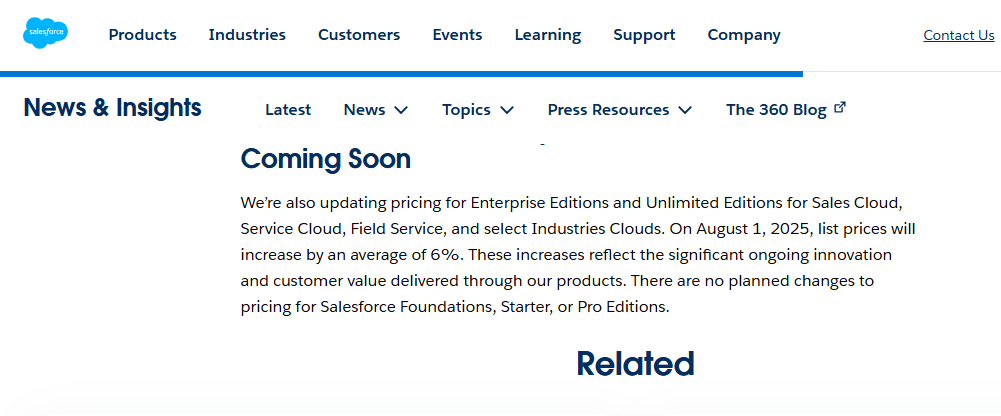
Alongside the increase, the company rolled out new Agentforce AI licensing, with add ons starting at $125 per user monthly and a fuller Agentforce 1 edition at $550, according to coverage in The Register11.
The industry reaction split, but the sharper edges of it were hard to miss. On the ecosystem publication Salesforce Ben12, one commenter wrote,
“This is insane, the timing is awful, and it is tin-eared.”
James Kelley, a manager at the consulting firm Pedowitz Group, told CX Today13 he doubted most of Salesforce’s client base was ready to actually deploy the AI features driving the increase, citing security concerns and data readiness gaps. Consultant George Rumbold, quoted in the same piece, pointed out the irony directly: Salesforce was raising prices to fund AI agents that, by the company’s own internal research, complete simple tasks correctly only 58 percent of the time, a figure that falls to 35 percent once a task requires multiple steps.
Pricing has not stabilized since. Newsletter SaaStr14 documented three distinct pricing models for Agentforce inside eighteen months: $2 per conversation at launch in October 2024, Flex Credits priced near ten cents per action starting in May 2025, and per-user licensing from June 2025 onward. Buyers were asked to model their spending against a moving target three separate times before the tool had even settled into a stable shape.
Zoom out and a pattern appears that matters more than any single number. Analysis of Salesforce’s fiscal 2026 results found that price increases on existing customers, not new customer acquisition, drove the majority of the company’s reported annual recurring revenue growth. A company that grows primarily by charging the people already inside the building more money, rather than by bringing new people through the door, has a very specific incentive. It needs those people to stay. And the most reliable way to make people stay is to make leaving expensive.
The Architecture of Staying Put
This is where the data access fees stop looking like isolated pricing decisions and start looking like a system. A former Salesforce employee, posting on Hacker News15 in a thread that drew thousands of replies, described the company’s approach to lock-in without much subtlety, calling the whole apparatus “a marketing funnel and a sucking black hole.” Strip out the color and the underlying claim holds up under scrutiny. Salesforce runs its own scripting language, Apex, its own front-end framework, Lightning Web Components, and its own flavor of query language, all built to keep customization inside the walls of the platform. Every validation rule, every custom object, every Flow automation a company builds represents work that does not travel easily to a competitor.
Data access fees compound that architecture rather than sitting apart from it. Monthly export cycles on the cheaper tiers. A 48-hour download window. A new 60-second throttle between files. Metadata excluded from the standard export. API access gated behind an add-on. A credit system for moving data between a company’s own Salesforce products. None of these, alone, is dramatic. Stacked together, they describe a very specific asymmetry: it is cheap and easy to put data into Salesforce, and expensive and slow to take it back out.
One of the more reliable signals that a platform’s native tools fall short is the size of the business built up around patching the gap. Salesforce has one of the largest third-party ecosystems in enterprise software, a fact the company celebrates openly as the Salesforce economy. Worth asking, then, how much of that economy exists specifically because Salesforce’s own export and backup tools stop short of what a serious business actually needs.
Gearset, Odaseva, Spanning, Copado, Flosum, SysCloud. Each one sells a version of the same pitch: we will do what the native Data Export Service will not, on a schedule you control, with the metadata intact, without a 60-second wait between files. Each one charges its own subscription on top of whatever a customer is already paying Salesforce. None of this is secret or underhanded. It is simply the market responding, rationally, to a gap that has been left open for a very long time. But it is worth sitting with the fact that closing the gap natively would mean giving away a revenue stream that currently belongs to somebody else, a partner ecosystem Salesforce has every incentive to keep intact rather than absorb.
I spoke with nobody at Salesforce for this piece, and I want to say that plainly rather than let it slide by unmentioned. What I found instead was consistent across primary documentation, independent pricing consultants, backup vendors with a financial stake in describing the problem accurately, and years of unglamorous forum threads from admins just trying to keep a lead sync running. Nobody in that pile of sources was arguing the same talking point. They kept landing on the same facts anyway.
There is a broader legal conversation forming around exactly this pattern. The European Union’s Data Act, in force since September 2023, includes provisions aimed squarely at cloud switching costs, requiring greater interoperability and limiting how much friction a vendor can build into the exit. Salesforce16 has published a compliance FAQ addressing the law, framing its position around the principle that customers own their data.
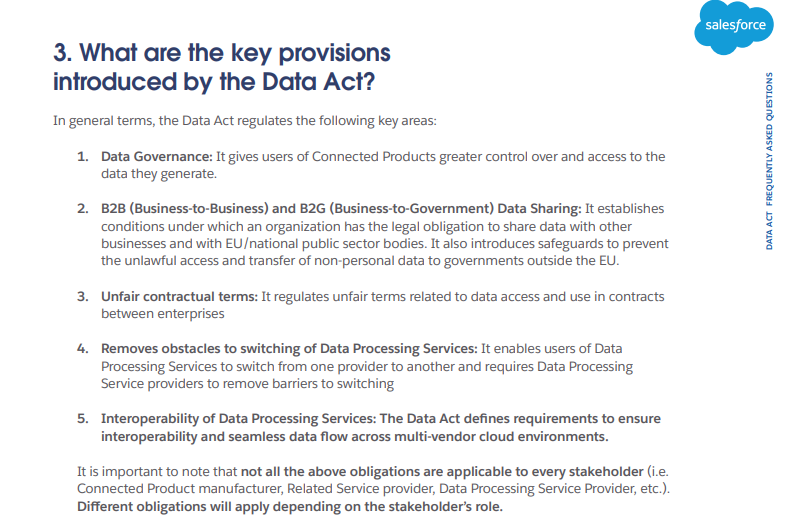
The framing is not wrong, exactly. It is incomplete. Ownership on paper and access in practice are different things, and the gap between the two is where the fees I have described in this piece live. A law can guarantee that the data is legally yours. It cannot, on its own, guarantee that getting it out will not cost you a 48-hour countdown, a 60-second throttle, an API add-on, and possibly a consultant to rebuild the metadata once you have it.
What This Actually Costs
Put the numbers side by side, and the shape of the thing gets easier to see. A 50-person team on Enterprise edition is paying roughly $105,000 a year in base license fees. Add a Premier Success support plan, which independent pricing guide Eesel17 notes typically runs 30 percent of net license fees, and the number climbs past $136,000 before a single integration is built. Add Data Cloud, and the entry point for the marketing edition alone starts around $108,000 a year according to review site Trustradius18, before a single row of external data has been processed. Add a third-party backup tool, because 70 percent of organizations have already concluded the native one is not enough. Add consultant time for integration work, which independent estimates put between $500 and $900 a day. None of these individual costs are unreasonable on their own. Enterprise software is expensive, and complex platforms need real engineering behind them. What struck me, reading through pricing guide after pricing guide this month, was how consistently the friction clustered around one specific activity: getting information back out of the system once it was already in.
I keep coming back to that CSV export I was waiting on, the one that started this whole story. It was not a dramatic moment. Nobody denied me anything. I just had to wait, and then wait again, and then wait once more between files, for something I had put into the system myself, months earlier, one record at a time. That is the quiet version of a toll booth. No gate arm swings down. No alarm sounds. You just find yourself, again and again, paying a small price to keep moving through a door you already own the key to.
Sources
- “Salesforce Help” help.salesforce.com/s/articleView?id=000383962&language=en_US&type=1. Accessed 26 July 2026. ↩︎
- “Salesforce Sales Pricing” Salesforce IN, www.salesforce.com/in/sales/pricing/. Accessed 26 July 2026. ↩︎
- “Salesforce Winter ’26 Weekly Export Changes & Solutions” Odaseva, 3 Feb. 2026, www.odaseva.com/blog/salesforce-winter-26-weekly-export-rate-limiting. Accessed 26 July 2026. ↩︎
- Jain, Rajeshwari. “Salesforce Data Export Limits – Winter ’26 Update Explained” Xappex, 12 Dec. 2025, www.xappex.com/blog/salesforce-data-export-limits/. Accessed 26 July 2026. ↩︎
- “Salesforce Backup: A Complete Guide for IT Admins” Https://Www.Syscloud.Com/, 16 May 2022, www.syscloud.com/saas-data-protection-center/salesforce/salesforce-backup/. Accessed 26 July 2026. ↩︎
- Author, About the. “Salesforce Pricing 2026: Plans, Add-Ons & Hidden Costs” Saas CRM Review, saascrmreview.com/salesforce-pricing/. Accessed 26 July 2026. ↩︎
- Zaa, Jitendra. “Salesforce Data 360 Credit Optimization Guide | 2026” Jitendra Zaa’s Blog, 13 Mar. 2026, www.jitendrazaa.com/blog/salesforce/salesforce-data-360-credit-optimization-guide-march-2026/. Accessed 27 July 2026. ↩︎
- Atrium, atrium.ai/resources/demystifying-salesforce-data-cloud-pricing-and-credit-consumption/. Accessed 27 July 2026. ↩︎
- “G2.Com” www.g2.com/products/salesforce-data-360-formerly-data-cloud/reviews?page=10. Accessed 27 July 2026. ↩︎
- “Updated Product Packaging and Pricing Offer New AI Capabilities and More Ways to Scale AI Throughout Every Organization” Salesforce IN, 17 June 2025, www.salesforce.com/news/stories/pricing-update-2025/. Accessed 27 July 2026. ↩︎
- Thomson, Iain. “Salesforce adds AI to everything, jacks up prices by 6%” 17 June 2025, www.theregister.com/2025/06/17/salesforce_ai_prices/. Accessed 27 July 2026. ↩︎
- Salesforce Ben, www.salesforceben.com/salesforce-announces-6-pricing-increase-and-unlimited-agentforce-licenses/. Accessed 27 July 2026. ↩︎
- March, Floyd. “Salesforce Hikes Its Prices, Aims to Mitigate High AI Integration Costs” CX Today, 18 June 2025, www.cxtoday.com/crm/salesforce-prices-set-to-sore-again/. Accessed 27 July 2026. ↩︎
- Lemkin, Jason. “Salesforce Now Has 3+ Pricing Models for Agentforce. And Maybe Right Now, That’s The Way to Do It.” SaaStrAI, 17 Feb. 2026, www.saastr.com/salesforce-now-has-3-pricing-models-for-agentforce-and-maybe-right-now-thats-the-way-to-do-it. Accessed 27 July 2026. ↩︎
- “As someone who has worked at Salesforce (and is on the way out): no thanks. Sale…” Hacker News, news.ycombinator.com/item?id=31940283. Accessed 27 July 2026. ↩︎
- 16 Sept. 2025, www.salesforce.com/en-us/wp-content/uploads/sites/4/documents/legal/Agreements/www.salesforce.com/en-us/wp-content/uploads/sites/4/documents/legal/Agreements/data-act-faq.pdf. Accessed 27 July 2026. ↩︎
- Pangan, Kenneth. “A guide to the Salesforce pricing calculator: What you’ll really pay in 2025” Eesel AI, 24 Nov. 2025, www.eesel.ai/blog/salesforce-pricing-calculator. Accessed 27 July 2026. ↩︎
- Trustradius, www.trustradius.com/compare-products/salesforce-data-cloud. Accessed 27 July 2026. ↩︎


