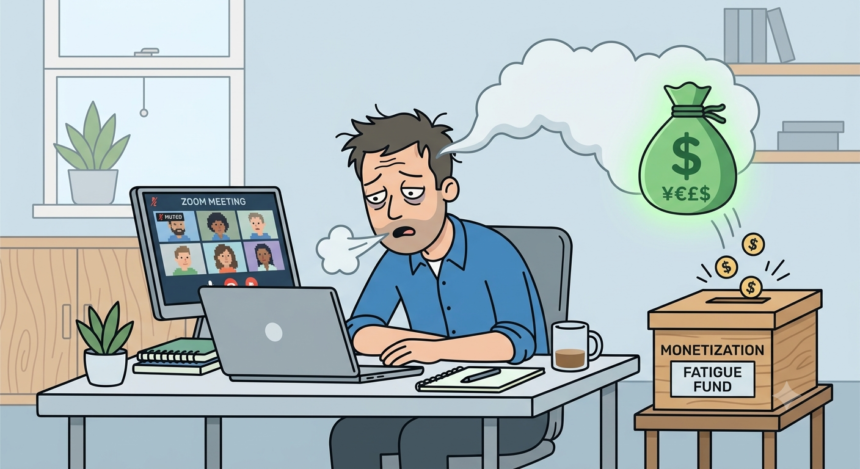

I have sat through enough video calls to know the exact moment my face stops listening. It happens around minute thirty five. My eyes stay open. My head still nods along on cue. But something behind the eyes checks out and goes for a walk. If you work anywhere near a laptop, you know this moment too. For five years now we have called it Zoom fatigue, and for almost as long, an entire industry has been finding ways to charge us for relief from it.
That is the part nobody wants to say out loud. The companies that built the tools which made our calendars unbearable are now the same companies selling us the AI that promises to make the calendars bearable again, and they are charging extra for it. Not always in dollars, though often that too. Sometimes the price is your engagement score. Sometimes it is your facial expression, harvested in real time and sold onward to a marketing partner you never agreed to meet.
I wanted to understand how this happened. Not the vague, TED talk version of “video call exhaustion is real,” which by now everyone accepts the way they accept jet lag. I wanted to trace the money. Who profits when your brain is fried by 3pm on a Tuesday. What it costs you to make the fried feeling go away. And whether the fix on offer is actually a fix, or just a second product built on top of the first problem.
The Diagnosis Nobody Asked For
Eric Yuan built a video app for a very specific kind of world, one where a call was an occasional thing, a bridge between two conference rooms. Then March 2020 happened and Zoom.us went from 71.6 million monthly visits to an all-time high of 2.8 billion visits in a matter of months, according to research cited by IEEE Spectrum1. Every meeting that used to happen by walking down a hallway now happened through a webcam, and it turned out the human brain was not built for that.
Researchers gave the feeling a name almost immediately. A University of Stanford2 team identified four specific culprits: excessive close-up eye contact, the cognitive load of reading faces on a grid, the strange out-of-body experience of watching yourself talk, and the simple fact that video calls trap your body in one chair for hours at a stretch. By 2021, “Zoom fatigue” had become shorthand for a specific, diagnosable kind of exhaustion, distinct from the tiredness of an in-person meeting.
Yuan himself admitted to feeling it. He told the Wall Street Journal3 in May 2020 that he was experiencing the same burnout as everyone else, and months later, he said that he had cut his own schedule from up to nineteen video meetings a day down to five or six. That is worth sitting with. The CEO of the company synonymous with the problem could not personally tolerate the product at full volume, so he built himself an exception. The rest of us got no such accommodation. We got a roadmap instead, one where Yuan promised that within five or ten years, video meetings would somehow feel better than the real thing, once the company solved the missing handshakes and hugs with augmented reality.
That promise has aged in an interesting way. The augmented reality hugs never arrived. What arrived instead was AI.
Before I go further, I should say the research is not as settled as the folklore suggests. A team at Johannes Gutenberg University Mainz, as presented by Cordia4, recently tried to replicate the original Zoom fatigue finding and could not. Over ten days, 125 participants logged 945 meetings, sixty-two percent of them virtual, and the researchers found, in the words of lead author Hadar Nesher Shoshan, no evidence that online meetings were more exhausting than face-to-face ones once other factors were controlled for. Her team had expected to confirm the old result. They did not.
Meanwhile, a separate 2025 study published in PLOS One pointed the exhaustion somewhere else entirely, at the mirror. Researchers found that what drives a lot of reported fatigue is not the meeting format itself but “facial appearance dissatisfaction,” the discomfort of staring at your own face for an hour and disliking what you see. As Michigan State doctoral student Said Lim put it as stated by Science Alert5, fatigue tied to how we feel about our own face is linked to people finding virtual meetings less useful, which in turn shapes whether they want to keep using the platform at all.
I bring this up not to dismiss what millions of people feel every week, because the feeling is real and widely reported regardless of what any single study concludes. I bring it up because the ambiguity is useful to the companies selling the fix. If the science cannot agree on what causes the exhaustion, no vendor has to prove their product actually treats the cause. They just have to promise relief, and let you decide for yourself whether it worked.
Step One: Charge for the Meeting Itself
Before we even get to AI, it helps to remember the basic architecture. Zoom’s free tier caps group meetings at forty minutes, which is not an accident of engineering. It is a wall built at the exact point where a normal work conversation starts running long, forcing a decision, do we cut this short or does someone pull out a credit card. The Pro plan, at roughly fourteen dollars a month per user, removes that limit and extends meetings out to thirty hours, an absurd number nobody needs, but the point was never the ceiling. The point was removing the floor level friction that made you feel the forty minute wall in the first place.
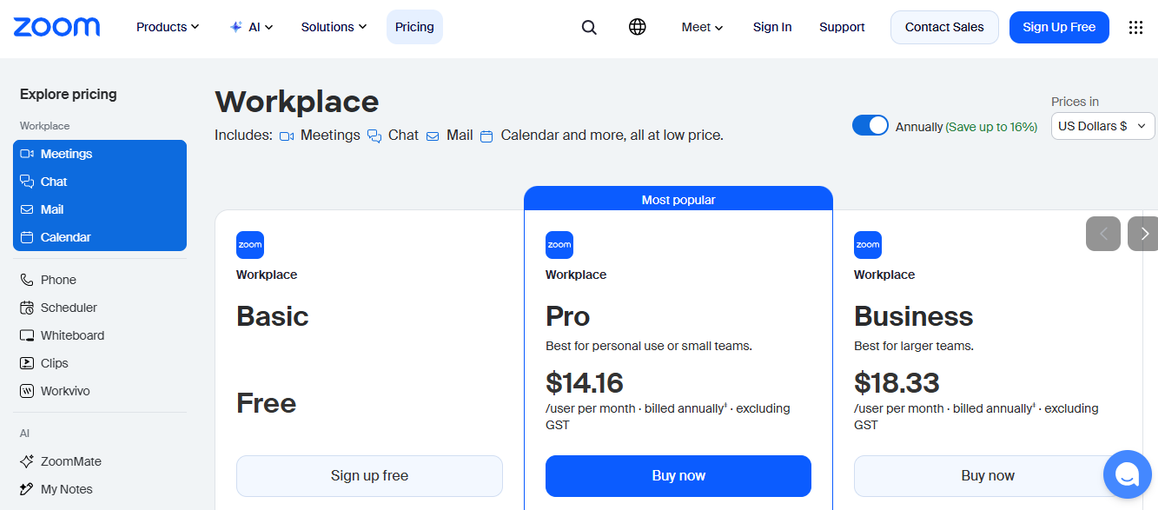
Once you are paying, the upsells keep coming. A breakdown from Secumeet’s6 2026 pricing guide lists Zoom Contact Center running from about sixty-nine dollars per agent per month up to one hundred forty-nine dollars for the top analytics tier, Zoom Rooms at forty-one to forty-nine dollars per room, and hardware for those rooms running one thousand to five thousand dollars or more before you have paid a single AI fee. This is the quiet architecture of the exhaustion economy. Every point of friction in the free product becomes a paid feature in the next tier up, and meeting fatigue turns out to be one more point of friction with a price tag attached.
Step Two: Sell the Antidote
Here is where it gets genuinely strange. Zoom’s answer to meeting overload is Zoom AI Companion, a suite that summarizes calls, drafts follow-up messages, and pulls out action items so you theoretically never have to sit through the recording again. To Zoom’s credit, the base version ships free with any paid plan, which the company has used as a selling point against Microsoft, whose Teams Copilot costs an extra thirty dollars per user on top of a Microsoft 365 subscription that already runs twenty-three to fifty-seven dollars. Compared to that, Zoom’s bundled approach looks almost generous.
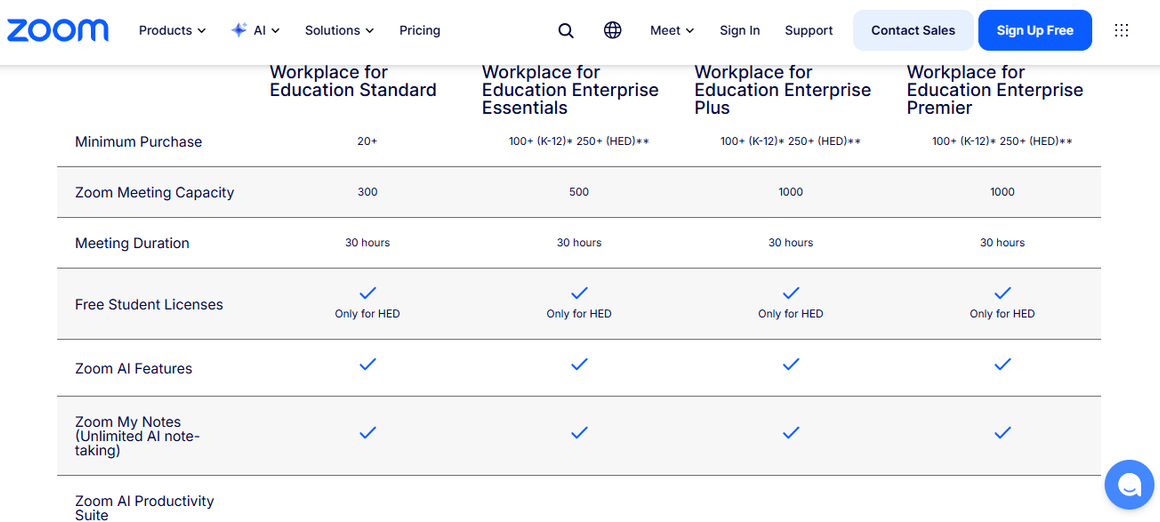
But bundled is not the same as included for everyone. The free Zoom tier, the one used by students, small nonprofits, and anyone not able to justify a business software line item, gets zero AI Companion features. None. The exhaustion relief is reserved for people who already pay for the product that is exhausting them. And once you look past the free base tier, Zoom keeps layering. AI Companion 2.0, the version with custom AI assistants and deeper workflow automation, starts at thirteen dollars per user per month on top of whatever tier you are already paying for, and a Custom AI Companion add on for cross platform notes and a “personal AI coach” runs another twelve dollars a month, according to Secumeet’s7 tally. Somewhere in that stack sits a genuinely useful idea, an AI tool that scans your calendar history, your role, and the topic of a meeting and then recommends which meetings you can skip entirely, reclaiming time and reducing what the company itself calls the “blurred line between essential work and time sinks.”
Sit with that phrase for a second. Zoom is selling you an AI tool to identify which Zoom meetings you should not attend. The company that makes money by the seat, by the license, by the minute of usage, has built and priced a product whose entire purpose is convincing you to use its own product less. I do not think that is cynical on Zoom’s part exactly. I think it is a company responding rationally to a market where “please make my calendar smaller” has become a thing people will pay for. But it does mean the industry has fully closed the loop. It creates the overload, then charges admission to the tool that manages the overload, then charges again for the tool that tells you which parts of the overload to skip.
If Zoom’s play is bundling, the smaller AI meeting assistants have built an entire business model on something sharper, which is measuring exactly how tired and disengaged you look, and selling that measurement to your boss.
Read.ai is the clearest example. Founded by former Foursquare CEO David Shim, the platform joins your Zoom, Teams, or Google Meet calls and generates what it calls an Engagement Score, a number built from talk time, sentiment, questions asked, and, when video is available, your body language. A comparison from AI tool reviewer Sybill8 described it plainly, Read captures engagement, sentiment, and participation levels in real time, producing a meeting score that tells you who spoke too much and whether the room’s mood ran closer to a Monday meltdown or a Friday flow. It even offers personalized coaching, nudging individual employees on their tone and pacing over time.
Reviewer Deepak Gupta9, testing the product for his own site, put his finger on the flaw that makes this whole category ethically slippery. Read.ai’s engagement scoring runs on observable signals like camera status and speaking frequency, so someone with their camera off but listening intently scores lower than someone with their camera on and quietly checking email in another window. The metric measures performance of attention, not attention itself, and it charges you for the privilege of being misjudged by it. Pricing for the tool runs from a limited free tier up through an Enterprise Plus package with a ten seat minimum at nearly forty dollars a seat per month for advanced governance controls, governance being a polite word for who in the organization gets to see your score.
The privacy angle goes further than most users realize. A review from data privacy outlet Cyber Unit10 dug into the fine print across six major meeting AI tools and found Read.ai standing alone in one specific way. Read.ai explicitly acknowledges in its privacy policy that it may sell identifiers, including hashed email addresses, cookie IDs, and employment information, to marketing and advertising partners, and it performs facial expression analysis on every participant in a call, including people who never signed up for a Read.ai account themselves. You can be scored by a tool you never opted into, sitting in a meeting someone else decided to record, and that score can become a data point sold to a marketer who has never met you.
One reviewer, writing for VoiceTypingTools11, tried to strike a balanced tone about this and still landed somewhere unsettling. Teams should be transparent about using Read AI, the review noted, and should understand that some employees may feel surveilled by engagement scoring, and the tool is best deployed with buy in rather than as a hidden management tool. Best deployed with buy in. That phrase is doing a lot of quiet work. It is an admission, dressed up as advice, that the default use case skips the buy in entirely.
I went looking for how workers themselves talk about all this, away from the vendor blog posts and the SEO content farms that dominate a Google search for “meeting fatigue.” The tech forum Blind, where people post under employer verified anonymity, turned out to be a much more honest source than most press releases.
One thread simply asked what people’s opinion on Zoom fatigue actually was, and the top replies were less about AI tools and more about basic self preservation.
The poster said:
I often feel exhausted after an 1 hour online meeting with more than 3 people in a way that a real-life one wouldn’t make me feel. We don’t have lots of long meetings but sometimes we meet with the whole team (8 people) for 1h-2h. What’s your experience in this regard? How do permanent remote workers or the ones who aspire to this status cope with Zoom fatigue?
At Blind12, one commenter described refusing to turn the camera on at all anymore, saying the constant expectation of eye contact felt like a performance that in person meetings never demanded, and that they would rather half watch something else on the side than stare at a colleague blabbering on useless things.
I felt bad and turned mine on first few times. But now, I’m like fk u -if you’re blabbering on useless things in the meeting, I’m not gonna stare at your face, I rather watch TikTok on the side
Another user described a personal rule, a ten minute walk for every hour spent on video, treating movement as the only reliable antidote they had found. Nobody in that thread mentioned an AI summarizer. Nobody mentioned an engagement score. The fixes people had actually landed on were free, physical, and slightly rebellious against the platform itself, cameras off, minds elsewhere, a walk around the block.
As a solution, one user offered:
I think we should all turn off the cameras and just have the conversations. The fatigue is significantly less.
The original poster replied that:
I’ve read once that the reason of this tiredness might be the lack of non-verbal communication. We subconsciously perceive less reward if we address the group without seeing their reactions.
That gap struck me as the real story underneath the pricing tables. The industry selling fatigue relief is not really competing against other AI note takers. It is competing against turning the camera off for free, and it knows it, which is part of why so much of the marketing leans on guilt and productivity anxiety rather than on the actual felt experience of being tired.
The Data Behind the Feeling, Whatever Its True Cause
Whatever the underlying psychological cause turns out to be, the raw numbers on meeting volume are not in dispute the way the fatigue mechanism is. According to Tactiq13, employees now spend an average of 392 hours a year in meetings, and 71 percent of senior managers admit their own meetings are unproductive and inefficient. A Calendly survey of over 1,200 workers across the US and UK found that 46 percent of workers attend three or more meetings a day, and at large enterprises, 59 percent spend five or more hours a week in meetings, compared to just 32 percent at smaller businesses. Atlassian’s research, cited by Speakwiseapp14, found that 78 percent of knowledge workers say they are expected to attend so many meetings that it becomes hard to get their actual work done, and 76 percent report feeling drained on heavy meeting days.
Notice who is citing these numbers. The statistics about how exhausting meetings are get published, almost exclusively, by companies that sell tools to fix meetings. Read.ai’s15 own blog states that the average professional spends 12.9 hours a week in meetings, roughly 84 working days a year, a statistic that functions less as neutral research and more as an advertisement for the product publishing it. This is not evidence of dishonesty exactly. It is evidence of an entire content ecosystem where the diagnosis and the prescription are written by the same hand.
The Bundling Trick, and Who It Actually Serves
Zoom’s decision to fold AI Companion into its paid tiers rather than charging separately, unlike Microsoft’s thirty dollar Copilot add on, gets treated in trade coverage as a consumer friendly move, and in a narrow sense it is. A ToolsBrief16 analysis walked through the math for a fifteen person team on Zoom’s Pro plan, landing on a cost of roughly $2,399 a year, against an estimated value of two to three hours per person per week in reclaimed admin time, which the analysis translated to something like $75,000 to $112,500 in annual labor savings. Framed that way, the AI Companion pays for itself many times over.
But look at whose ledger that savings lands on. The freed up hours belong to the employer, not the employee holding the calendar. Nobody in that math is asking whether the worker whose facial dissatisfaction is being tracked, whose engagement score is being calculated, whose forty minute free meeting was capped specifically to force an upgrade, actually got anything back besides a slightly shorter summary email. The AI Companion reduces the administrative tax of meetings. It does not reduce the number of meetings, and in the case of Read.ai’s engagement scoring, it can actively increase the psychological cost of being in one, because now every call carries a quiet scoreboard nobody consented to.
Here is my honest read on all of this, after weeks of reading pricing pages and forum threads and academic abstracts. The meeting fatigue economy is not a scam in the legal sense. Nobody is lying about what these tools do. Zoom really does summarize your meetings. Read.ai really does generate an engagement score. The products work roughly as described. What makes the whole arrangement feel uncomfortable is something closer to a structural conflict of interest, the same company, or the same category of company, sits on both sides of your exhaustion. One side of the business benefits from you being in more meetings, longer meetings, more meetings with video on, because that is what the seat based pricing model rewards. The other side of the business, sometimes literally the same product suite, sells you a subscription upgrade to make those very meetings less draining, or at least less draining to manage afterward.
It is a bit like a mattress company also owning the espresso chain across the street. Both businesses are legitimate. Both solve a real problem for the customer walking in the door. But it is worth noticing that neither business actually wants you to sleep well enough to stop needing either product.
I do not think the fix here is complicated, even if the industry has made it feel that way. Turn the camera off when you do not need it on. Ask, honestly, whether a meeting could have been three sentences in a chat message instead. Do not confuse an engagement score with actual engagement, and be skeptical of any tool that claims to measure the inside of your head from the outside of your face. The AI Companion tier might genuinely save you time on a Tuesday afternoon. It will not, by itself, make you want to be in fewer rooms. Only you can decide that, and so far, no pricing tier has found a way to charge for it.
Sources
- Choi, Charles Q. “Zoom Fatigue is Real, According to Brain Scans” IEEE Spectrum, 21 Nov. 2023, spectrum.ieee.org/zoom-fatigue. Accessed 27 Sept. 2026. ↩︎
- “Meeting 23/02/21: Is Learning on Zoom the Same as In Person?” 23 Feb. 2021, generic.wordpress.soton.ac.uk/pegasus/2021/02/23/meeting-23-02-21-is-learning-on-zoom-the-same-as-in-person/. Accessed 27 Sept. 2026. ↩︎
- WSJ, www.wsj.com/lifestyle/workplace/even-the-ceo-of-zoom-says-he-has-zoom-fatigue-11620151459?eafs_enabled=false. Accessed 27 Sept. 2026. ↩︎
- Cordis. “Is it time to say goodbye to Zoom fatigue?” H2020, 9 Oct. 2025, cordis.europa.eu/article/id/461151-is-it-time-to-say-goodbye-to-zoom-fatigue. Accessed 28 Sept. 2026. ↩︎
- Science Alert, www.sciencealert.com/zoom-fatigue-scientists-say-your-face-might-be-the-problem. Accessed 28 Sept. 2026. ↩︎
- Afton, Helga. “Zoom Pricing Guide 2026: Plans, Costs, and How to Choose” Secure Meetings, 13 July 2026, secumeet.com/reviews/zoom-pricing. Accessed 28 Sept. 2026. ↩︎
- Afton, Helga. “Zoom Pricing Guide 2026: Plans, Costs, and How to Choose” Secure Meetings, 13 July 2026, secumeet.com/reviews/zoom-pricing. Accessed 29 Sept. 2026. ↩︎
- Sybill, www.sybill.ai/blogs/read-ai-vs-otter-ai. Accessed 29 Sept. 2026. ↩︎
- Deepak Gupta, guptadeepak.com/tools/top-5-meeting-intelligence-tools-2026. Accessed 30 Sept. 2026. ↩︎
- “AI Meeting Recorders Are Collecting More Than You Think” Cyber Unit, 7 Apr. 2026, cyberunit.com/insights/ai-meeting-recorder-privacy-what-businesses-should-know/. Accessed 30 Sept. 2026. ↩︎
- “Read AI Review 2026: Meeting Analytics with Engagement Scoring” VoiceTypingTools, 19 Feb. 2026, www.voicetypingtools.com/tools/read-ai. Accessed 30 Sept. 2026. ↩︎
- “Your Anonymous Workplace Community” Blind, www.teamblind.com/post/whats-your-opinion-on-zoom-fatigue-7acpwn0j. Accessed 30 Sept. 2026. ↩︎
- Chan, Stephanie. “Zoom Meeting Statistics 2026: Usage, Revenue & Data” 16 July 2026, tactiq.io/learn/zoom-meeting-statistics-2026. Accessed 30 Sept. 2026. ↩︎
- Team, Speakwise. “Meeting Fatigue Statistics 2026: Burnout, Declining Productivity, and Calendar Overload” Speakwise, 24 Jan. 2026, speakwiseapp.com/blog/meeting-fatigue-statistics. Accessed 30 Sept. 2026. ↩︎
- “Meeting Fatigue Causes, Signs & Fixes That Work” www.read.ai/articles/meeting-fatigue-causes-signs-fixes-that-work. Accessed 30 Sept. 2026. ↩︎
- Toolsbrief, toolsbrief.org/zoom-ai-review-2026-capabilities-pricing-competitor-breakdown/. Accessed 30 Sept. 2026. ↩︎