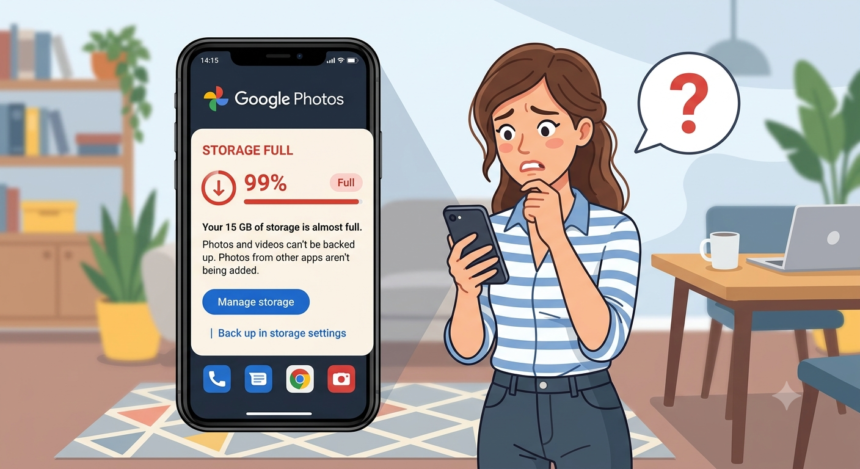

Google makes it easy to buy more storage. Getting back to less takes a map, some luck and a working knowledge of what counts as a photo.
Andy Boxall had a good year with a Pixel. As documented by Android Police1, the phone came with twelve months of Google’s AI Pro plan, and the plan came with 2TB of storage. For years he had paid $2 a month for 100GB and kept his photo library trimmed because he had to. With 2TB he stopped trimming. The extra room made him lazy, he wrote, and by the end of the year his stored data had grown to 125GB.
Then a $20 charge landed. He wanted his old plan back. The old plan held 100GB. He now held 125. He would have to clean house before he could go home.
I keep turning that arithmetic over. It is a small thing. A free year made one man’s library bigger than the plan he had always paid for, and nobody needs a villain to explain it. But multiply it by every reader who got a year with a phone, a trial with a click or a bundle from a carrier. You get a crowd standing in front of a door they cannot find, holding more than the room behind it can carry.
This is a story about that door. It is about Google Photos, but only in a way. There is no separate Photos plan. Google2 sells one pool of space that Gmail, Drive and Photos share, and for a lot of people Photos is what fills it. What gets called the Google Photos storage downgrade is really three events wearing one name. A plan gets smaller. An account goes over its limit. A file gets squeezed. Google’s menus, its help pages and its own history blur the three together, and so do the people who write in asking for help.
I read the help pages, the trade press and a long tail of forum posts to see where the blur comes from. Some of it looks like accident. Some of it looks like design. Where I could tell which was which, I will say so. Where I could not, I will say that too.
The Menu that Only Goes Up
Google’s3 help page makes the downgrade sound easy. You open your plan settings and pick a plan from the downgrade options. If none is offered, you are already on the lowest one. The change starts with your next billing cycle, so the bigger plan runs until then. Simple enough.
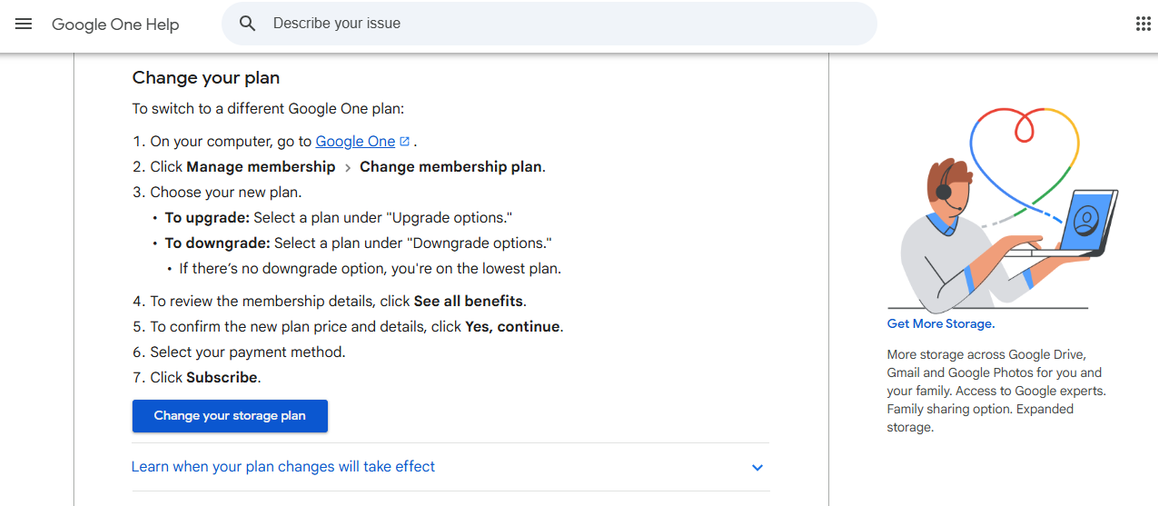
Boxall found something else. On the Google One home page, a Manage button led to a screen full of upgrades. The Storage and Plans menus in the app carried a button that read Get More Storage. No button read the opposite. The cheaper plans, meaning 100GB, 200GB and a 2TB plan without AI, sat behind a See All Plans link. He set this next to Apple’s iCloud, where the same path opens a list with plans above and below the one you own.
Sean Captain, writing for Techlicious4, hit the same wall. His free trial of AI Pro was running out, and he wanted his old $2.99 plan with 200GB. He could not find the way back. He noted that Reddit threads going back two years showed other people stuck in the same spot, and that some had cancelled just to get out. He cancelled too. Only then did Google offer the downgrade he had been hunting for. He rebuilt the route on a fresh account to see how deep the maze went. At one point the Storage page recommended a 5TB plan at $24.99 a month while showing that he used 0.17GB of 2TB. Then he published the way out. Start at one.google.com. Click Manage membership. Scroll past the upgrades. Find the tiny text that says See more plans. Keep going until you reach a section called Downgrade Options, or in some accounts More Options.
Then the comment section did what comment sections do. In March 2026 a reader named Siegmund Goldschmidt wrote that Manage membership had vanished. He had been “going in circle for 40 minutes,” he said. Then he found the new route by stumbling onto it. A cogwheel beside the profile icon. Change membership plan. Scroll. See more plans. He left the directions for whoever came next, and Captain thanked him and said Google changes its screens often.
It happened in 2024 too. When Google stopped showing the 200GB plan to new sign-ups that February, a reader named David Hermann told 9to5Google5 he had tried to leave the AI tier and was told “there isn’t anything to downgrade to.” So he cancelled. A day later an email from the One team said that once the cancellation finished, he could subscribe to 200GB again. Google later said that the plan was “still very much available.” Both things were true at once. The plan existed. The customer could not reach it.
The help forums say the same thing in their titles. In February 2025 someone opened a Google One Community thread6 called “Cancel AI premium and get back to Storage basic.” Another thread there asks how to go from the 200GB plan to the 100GB plan. In May 2025 a user in the Google Drive Community7 reported losing an original 2TB plan after starting an AI Premium trial. I could read only the titles and dates. The replies sit behind scripts that would not load for me. The titles are still evidence. A person writes a thread like that when the way back has gone missing.
The iPhone is worse. Google’s own page says that a plan bought through Google’s website cannot be changed on an iPhone or iPad. Pocket-lint8 found that the iPhone app does not even show a Get more storage button. The most you can do there is reach a webpage where you can cancel.
Nobody agrees on what is for sale
On April 1, 2026, a Google executive announced on X that AI Pro would grow from 2TB of storage to 5TB at the same $19.99 a month. PhoneArena9 reported it and noted that the older plans without AI stood unchanged, 100GB at $1.99 and 2TB at $9.99. Less than two months later, Android Authority10 wrote that the plain $10 plan with 2TB had been quietly removed and could no longer be found on Google One’s website.
The same piece counts a new $8 AI Plus plan with 200GB, a $100 Ultra tier announced at Google I/O, and a cut in the top Ultra price from $250 to $200. Its subtitle put it plainly:
“Too many plans, too many limits, too much confusion.”
In October 2025, Gadget Hacks11, citing Android Authority, counted nine tiers and said what you see depends on whether you are logged in, which device you hold and your account history.
Now put yourself in the chair of the person who wants to shrink. You do not know the list. You do not know which plans are real this week. You know one thing, which is the number in the corner of the screen that says how full you are. That number is the next problem.
Downgrade used to mean something else. In 2015, TechCrunch12 described a Google Photos option to “downgrade” uploads from Original quality to High quality, which shrank the files and kept them from counting against your space. The word meant squeezing the pictures.
Today the same word means paying less. A person who types it into a search box gets both.
The questions show it. In 2019 someone opened a thread in the Google Photos Community13 asking, “will my photos and videos be downgraded and stay?” In January 2023 another was titled “What Happens When You Stop Paying for More Storage?” Another asks what happens when someone stops paying for the 100GB plan. Different years, different words, same question. When a question keeps coming back, the answer has gone missing somewhere.
The person in 2019 had the right instinct and the wrong verbs. The plan and the files do not move together. Except when they do.
Google Photos has a tool called Recover storage. It converts photos and videos you already backed up in Original quality into Storage saver copies. Google’s help page14 says you can run it once a day and that it does not change the quality of future uploads.
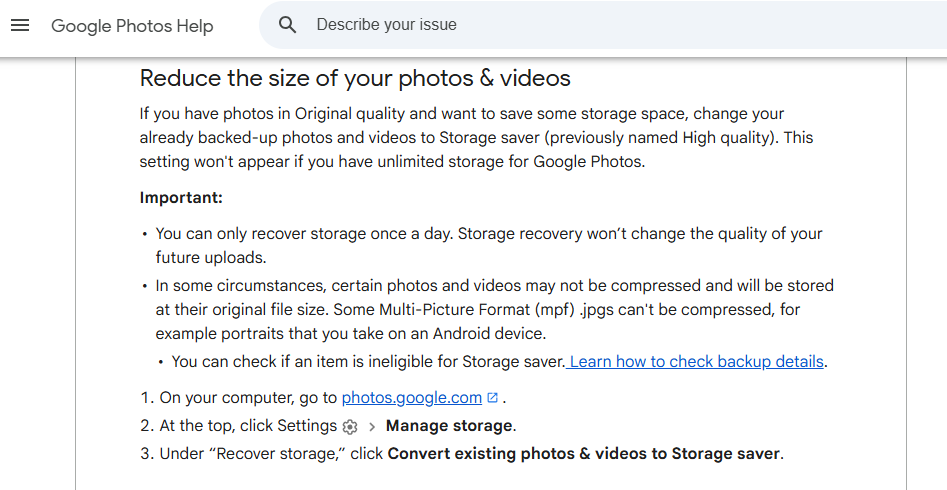
XDA Developers15 wrote in July that Google made the author confirm the compression could not be undone, and that photos above 16 megapixels may be resized while high-resolution video may drop to 1080p. In 2023 a user opened a Google Photos thread16 that starts with the word URGENT and asks how to stop or undo the compression.
I have paid google storage and i was looking around an easy way to compress a few large videos. I clicked on the recover storage and it is now compressing my files. But i do NOT want all my files compressed, that is why i am paying for the extra space. HOW DO I STOP THIS???
Here is what bothers me. A plan change is a billing event. You can undo it next month. Compression is a file event. You can never undo it. Yet the first can push a person toward the second. When a number on the screen says you are 25GB too big, a button that shrinks everything looks like mercy. Google does not hide the warning. It asks you to check a box. But the box arrives late, after a person has spent an hour lost in the menu, and tired people click boxes.
Then there is the quiet meaning, and it is about counting. Every Google account gets 15GB, shared. Originals always count. Storage saver copies backed up after June 1, 2021 count. Copies backed up before that date do not. That date is the leftover of an older downgrade. In November 2020, Google said the free, unlimited high quality uploads would end the following June. It said fewer than 20 percent of its more than one billion monthly users would need to buy more space in the next three years. NBC News17 reported both. When the change arrived, Google renamed High quality to Storage saver. The new name was meant to make things less confusing.
Google’s own FAQ takes up the puzzle that follows. A person deletes thousands of old photos and their storage does not change. The answer, per Google’s help page, is that those old Storage saver photos never counted, so removing them frees nothing. After large deletions, Google18 says, the number can take 48 to 72 hours to update. Deleted Photos items go to a bin first, and the bin’s life is 30 days on one Google page and 60 on another. I could not tell whether that reflects a difference between platforms or drift between pages.
Put two rules side by side. A downgrade takes effect at the start of the next billing cycle, and until then the bigger plan keeps running. Deletions can take up to 72 hours to show. Together they make a small trap. A person who starts cleaning in the last three days of a cycle may do everything right and still cross the line before the number catches up. Google does not say that anywhere I could find. It falls out of two pages read together. That is how most of this confusion works. No page lies. The pages just never meet.
So a careful person can spend an afternoon deleting the wrong things, see no change, and decide the tool is broken. It is not broken. It is counting something other than what they are counting.
The Wrong App Breaks
Now the cliff. When an account goes over its limit, Google’s pages agree on the main points. Photos cannot back up anything new. Drive cannot take uploads. Docs and Sheets cannot create files. And then there is Gmail.
One Google19 page says flatly, “You can’t send or receive messages.” Another, the general explainer on how storage works, says only that your ability to send and receive email “can be impacted.” A third says mail sent to you goes back to the sender. I do not know why the wording differs. It may be caution. It may be drift. For someone deciding whether to shrink a plan, the difference is large. One reading says trouble. The other says lockout.
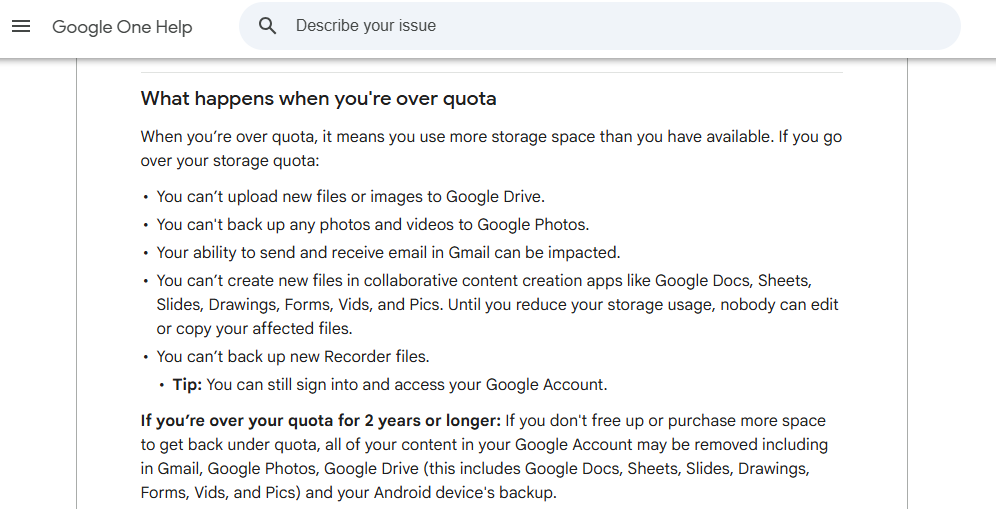
One more line gets little attention. Google says that until you reduce your usage, nobody can edit or copy your affected files, and that files in shared folders count against the owner and not the recipient. The pages stop short of spelling out who gets hurt. Read together, they suggest a person who goes over could lock collaborators out of documents that person owns.
Notice where the damage falls. The person deciding is thinking about photos. The photos are why they pay. In a poll of 745 Android Authority readers, 46 percent said they use Google One mainly for Photos backups, 21 percent for Drive and 8 percent for Gemini, with the rest a mix. That is a reader poll and not a survey, so I would not lean hard on it. It still fits what the forum titles suggest. People think about their pictures.
Their pictures are the safe part. Google does not delete what you already have the moment you go over. Android Authority20 notes you can still view, download and delete everything, even when 100GB of it sits over the line. That is fair to Google and worth saying. Email is what stops. Pocket-lint’s line about the fallout is blunter, saying it can “potentially cripple your Google account.” The decision is about photos. The bill arrives in your inbox.
Google says content may be deleted if an account stays over quota for two years. It says it will give at least three months of notice, a chance to fix the problem and a chance to download everything. It also says its Inactive Account Manager settings do not override the rules.
The internet’s version is harsher. In February 2024 an anonymous reader on GSMArena21 told others to picture “being hospitalized for 3 months or going to prison,” because, the reader said, cloud backups vanish for good once you stop paying. That is wrong on the numbers, at least under Google’s stated rules. Three months of missed payments does not start a purge. The clock is two years, plus notice.
But I understand why the fear sticks. Look at how the warning is supposed to travel. Google says it will try to reach you by email and by notices inside its apps. It also says that once you are over quota, mail sent to you bounces back to the sender. The storage page does not say whether Google’s own warnings escape that rule. It does link to a place to manage the email address on your account, so perhaps the warnings go to a contact address. Perhaps. I would not stake a decade of photos on perhaps.
There is also a crowd that never chose anything. A Basic plan can be shared with up to five people. BGR22 writes that when a subscription ends, family members get the same drop back to 15GB, and that:
“Every person sharing that Google One plan will be affected.”
One person taps cancel. Five others may find their phones have stopped backing up.
How Free Gets Expensive
Back to Boxall. He wrote that nothing reminded him he was eligible for another free year of AI Pro on a new phone, and no email warned him that the paid plan was about to begin. Gadget Hacks says people often find the $20 charge after the fact. Its phrase for the way the downgrade path is built is “obstructive architecture.” That is a hard phrase to throw at a company, and I cannot see inside Google to say whether the intent matches it. I can say the effect looks the same either way.
The business behind it is not small. Gadget Hacks, pointing to Android Police’s reporting, says Google One passed 150 million subscribers in May 2025, up 50 percent in 15 months, and credits much of that to the AI plans. The pitch is easy to understand. PhoneArena worked the math. AI Pro costs twice as much as the plain 2TB plan and gives 2.5 times the storage plus the AI tools. It called the older plans an on-ramp and not a place to stay. A Hacker News23 commenter, in an April thread about coding tools, was already paying for photo storage and wrote that AI Pro for an extra $7 “is a steal.”
Already paying for Google photo storage, AI pro for an extra $7 is a steal with anti-gravity.
I do not think the bundle is a trick. For many people it is a good deal, and Android Authority, no friend of the plan sprawl, calls 5TB for $20 an exceptional value. The trouble is what the bundle does to the way back.
Here is what I think happens. Room you never hit feels like nothing. Boxall never came near the 2TB. What changed was that he no longer had to choose. Choosing is the habit that keeps a library small, and habits fade in a year. So a free year is not really free. It lends you a habit and bills you when it ends, and the bill is the cleanup you skipped.
The One True Downgrade
T-Mobile customers had it better than anyone. Since 2022 the carrier offered a plan with 2TB plus unlimited Google Photos storage for $15 a month, and it was the last subscription of its kind. Enrollment closed on September 30, 2025. At the end of March 2026, billing moved to Google, and the unlimited perk ended with it. Customers who cancelled would drop to 15GB, that doing nothing meant automatic cancellation, and that it was unclear how files uploaded before the switch would be treated, though they would likely count toward the new quota. According to Phone Arena24, T-Mobile customers will soon lose unlimited Google Photos storage.
There are mixed reactions from Reddit. One user said losing 500GB for five dollars a month would hurt. Another said the unlimited Photos plan was the only thing keeping them with T-Mobile and that their photos alone “will be 2.2Tb.” By the numbers in that post, the user sits just above the 2TB line. On April 1 someone started a thread in the Google Photos Community25 with a title saying that after losing the T-Mobile plan, “now no Google plan fits my storage.” I cannot say it is the same person. I can say the title describes the same problem.
This is the only true downgrade in the story, the kind a company does to you. Everything else is the kind you do to yourself. It happened in the open, with a text message and a support page. It still produced the old questions. What counts. What stays. What happens to the pile.
In the coverage I found, Google’s on-record answers come down to its help pages and that 2024 line about the 200GB plan. The help pages are decent once you reach them. They state the limits, the two-year clock, the three months of notice and the route to a cheaper plan. Nothing I read suggests files vanish next week. So the complaint is not that Google hides the rules. It is that the plain pages sit behind confusing menus, and the confident menus are the ones that sell.
I can see the case for the company. Storage costs money. Free years are costly gifts. Plans multiply because products multiply. A company that sells 5TB for $20 a month can fairly call the deal generous. But generosity you can walk out of is one thing. A door that only swings inward is another.
Three fixes seem obvious to me and none needs new technology. Put the way down on the same screen as the way up, the way Boxall says Apple does. Before a downgrade confirms, show the person’s real usage next to the new plan’s limit, and say in plain words what will stop, with the word bounce if mail will bounce. And put the date on it. Google says the change lands at the start of the next billing cycle. It should say so on the confirm screen and in the email, in a sentence a tired person can read.
Boxall’s advice for anyone in the same spot is dull and right. Find your renewal date before it finds you. It lives under Payments and subscriptions in your Google Account.
The route Siegmund Goldschmidt found in March may already be gone. Somewhere tonight, I would bet, another person is thirty minutes into the same search. They will find a stranger’s directions in a comment box, and they will hope the cogwheel has not moved. For a service with 150 million subscribers, that is where the working map lives.
Sources
- Boxall, Andy. “I fought back against Google’s sneaky Google One subscription trap” 21 Sept. 2025, www.androidpolice.com/spending-less-on-google-one-wasnt-easy/. Accessed 8 Oct. 2026. ↩︎
- “How your Google storage works” Google One Help, support.google.com/googleone/answer/9312312. Accessed 8 Oct. 2026. ↩︎
- “Update your Google One plan & fix upgrade issues” Google One Help, support.google.com/googleone/answer/9003633. Accessed 8 Oct. 2026. ↩︎
- Captain, Sean. “Downgrading Your Google One Plan Is Confusing. Here’s How to Do It” Techlicious, www.techlicious.com/blog/how-to-downgrade-google-one-account-plan/. Accessed 8 Oct. 2026. ↩︎
- Schoon, Ben. “Google One hides 200GB plan, making it difficult to subscribe to” 14 Feb. 2024, 9to5google.com/2024/02/14/google-one-200gb-plan-hidden/. Accessed 8 Oct. 2026. ↩︎
- “Cancel AI premium and get back to Storage basic” Google One Community, support.google.com/googleone/thread/325657153/cancel-ai-premium-and-get-back-to-storage-basic?hl=en. Accessed 8 Oct. 2026. ↩︎
- “Lost My Original 2TB Google One Plan After Subscribing to AI Premium Trial” Google Drive Community, support.google.com/drive/thread/342068706/lost-my-original-2tb-google-one-plan-after-subscribing-to-ai-premium-trial?hl=en. Accessed 8 Oct. 2026. ↩︎
- Fingas, Roger. “You can downgrade your Google One plan without outright cancelling – here’s how” Here’S How, 29 Sept. 2025, www.pocket-lint.com/downgrade-google-one-plan/. Accessed 8 Oct. 2026. ↩︎
- Phonearena, www.phonearena.com/news/googles-20-ai-plan-just-got-a-huge-storage-jump-and-the-math-is-hard-to-ignore_id179425. Accessed 8 Oct. 2026. ↩︎
- Android Authority, www.androidauthority.com/google-one-plans-confusion-2026-3669231/. Accessed 8 Oct. 2026. ↩︎
- Gadget Hacks, android.gadgethacks.com/news/google-one-subscription-maze-traps-users-with-hidden-costs/. Accessed 8 Oct. 2026. ↩︎
- Perez, Sarah. “Google Photos Will Now Help You Free Up Space On Your Phone” TechCrunch, 17 Nov. 2015, techcrunch.com/2015/11/17/google-photos-will-now-help-you-free-up-space-on-your-phone. Accessed 8 Oct. 2026. ↩︎
- “Downgrading to free plan, will my photos and videos be downgraded and stay?” Google Photos Community, support.google.com/photos/thread/9035069/downgrading-to-free-plan-will-my-photos-and-videos-be-downgraded-and-stay?hl=en. Accessed 8 Oct. 2026. ↩︎
- “Choose the backup quality of your photos & videos” Google Photos Help, support.google.com/photos/answer/6220791. Accessed 8 Oct. 2026. ↩︎
- Shah, Parth. “I flipped one switch in Google Photos and cleared 15GB of space without deleting a single picture” 26 July 2026, www.xda-developers.com/flipped-one-switch-google-photos-cleared-space-without-deleting-picture/. Accessed 8 Oct. 2026. ↩︎
- “URGENT:Stop or undo ”recover storage” compressing my photos and videos!” Google Photos Help, support.google.com/photos/thread/220387396/urgent-stop-or-undo-recover-storage-compressing-my-photos-and-videos?hl=en. Accessed 8 Oct. 2026. ↩︎
- News, NBC. “Google curtails free photo storage, pushes users to buy more space” 11 Nov. 2020, www.nbcnews.com/business/business-news/google-curtails-free-photo-storage-pushes-users-buy-more-space-n1247461. Accessed 8 Oct. 2026. ↩︎
- “Manage your storage” Google Photos Help, support.google.com/photos/answer/9284827. Accessed 8 Oct. 2026. ↩︎
- “How your Google storage works” Google One Help, support.google.com/googleone/answer/9312312. Accessed 8 Oct. 2026. ↩︎
- Android Authority, www.androidauthority.com/what-happens-if-i-cancel-my-google-one-subscription-3547669/. Accessed 8 Oct. 2026. ↩︎
- “Google One now has more than 100 million subscribers” Reader comments, m.gsmarena.com/newscomm-61557p2.php. Accessed 8 Oct. 2026. ↩︎
- Smith, Chris. “What Happens To Your Photos And Data If You Cancel Google One?” 2 June 2026, www.bgr.com/2182832/what-happens-to-photos-data-if-you-cancel-google-one/. Accessed 8 Oct. 2026. ↩︎
- “Already paying for Google photo storage, AI pro for an extra $7 is a steal with …” Hacker News, news.ycombinator.com/item?id=47651562. Accessed 8 Oct. 2026. ↩︎
- “PhoneArena” T-Mobile customers will soon lose unlimited…, www.facebook.com/PhoneArena/posts/t-mobile-customers-will-soon-lose-unlimited-google-photos-storage/1471136784668299/. Accessed 8 Oct. 2026. ↩︎
- “Lost T-Mobile 2TB + unlimited Photos plan, now no Google plan fits my storage” Google Photos Community, support.google.com/photos/thread/421640648/lost-t-mobile-2tb-unlimited-photos-plan-now-no-google-plan-fits-my-storage?hl=en. Accessed 8 Oct. 2026. ↩︎