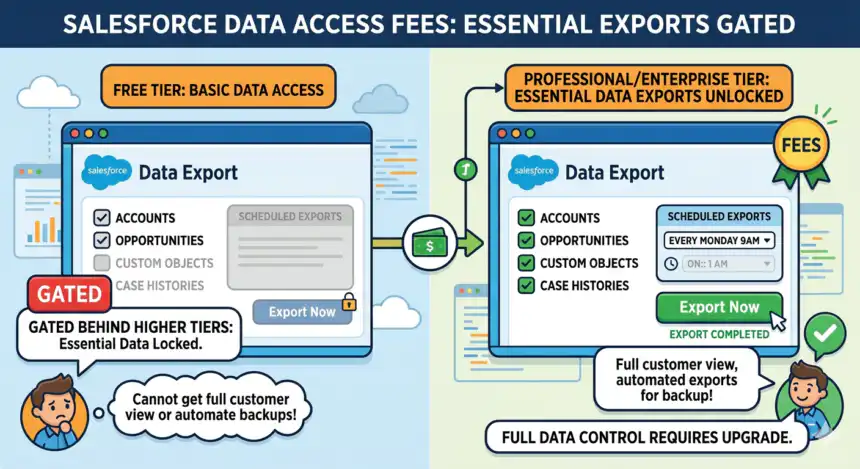

Enterprise software is notorious for inducing a unique and highly specific type of user frustration. It is not the frustration of a crashed laptop or a slow internet connection. It is quieter and more expensive. It lives in contract renewal seasons, in conversations with account executives, in the slow realization that the data you have been feeding into a system for years is somehow harder to get out than it was to put in.
Salesforce is not the only company that does this. But it does it with unusual thoroughness, and it does it at the center of more businesses than almost any other software platform on earth. The San Francisco CRM giant holds the top position in the global CRM market, and as such, its pricing structure is not just a business decision. It shapes how millions of companies think about their customer relationships, their reporting obligations, and their right to retrieve information they have spent years accumulating.
What I found, after weeks of digging through documentation, forum threads, pricing breakdowns, and analyst reports, is a system layered with friction at every point where a customer tries to move their own data. Some of those friction points are structural. Others are billing-based. A few were walked back only after sustained public complaint. All of them tell the same underlying story: that in the Salesforce world, access to your data is a feature, and features cost money.
The Basics of the Tier Wall
Let us start with the thing most Salesforce customers first notice. The platform divides its export functionality by edition, and the differences are material.
Weekly exports are available in Enterprise, Performance, and Unlimited Editions. In Professional Edition and Developer Edition of Salesforce1, you can generate backup files only every 29 days, or automatically at monthly intervals only.
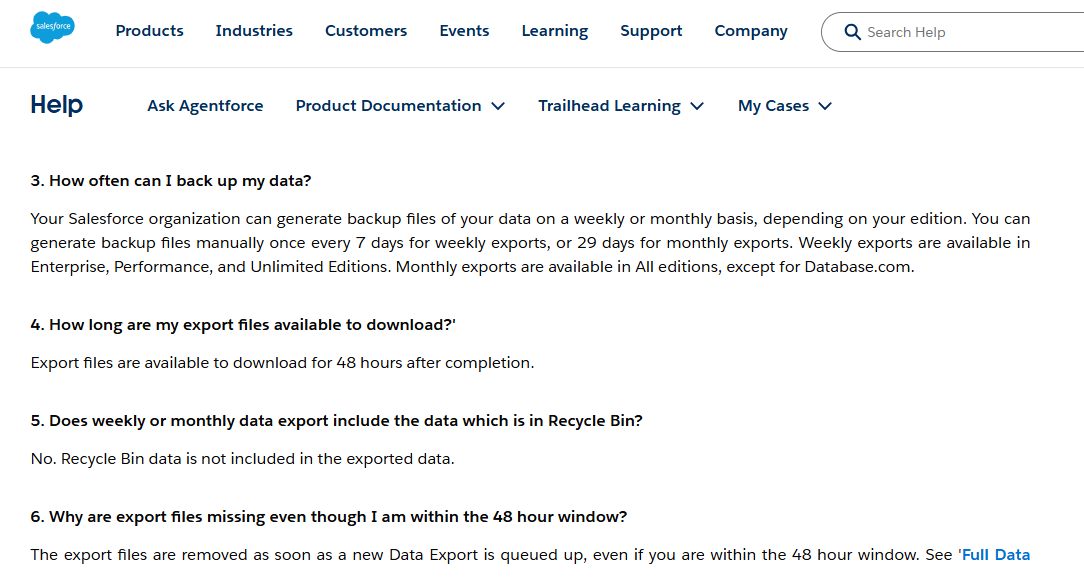
This means a business on the Professional tier, a meaningful chunk of Salesforce’s customer base, can only pull a full export of its data once per month. If that business deletes a record on day two of the cycle and discovers the mistake on day fifteen, it has no native path to recover it. The window has closed. The data is gone.
Professional and lower editions limit you to monthly exports (every 29 days). These export frequencies can mean that you have a Recovery Point Objective (RPO) of up to a month. So consider the frequency of data changes happening in your org and how critical your Salesforce data is to help decide whether a month of lost data is an acceptable level of risk for your business.
The framing from Gearset there is careful and polite. But that last sentence is doing a lot of work. Whether a month of lost data is an “acceptable level of risk” is not really a question most companies want to answer after the fact. It is the kind of risk that gets surfaced in post-mortems when the answer has already been revealed.
Salesforce Pricing2 makes it pretty clear. The tier that unlocks weekly exports, Enterprise, starts at approximately $175 per user per month, billed annually. That is $2,100 per user per year before any add-ons, support plans, or storage overages. For a 50-person sales team, you are looking at over $100,000 in base license fees before you have bought the right to export your data every seven days instead of every twenty-nine.
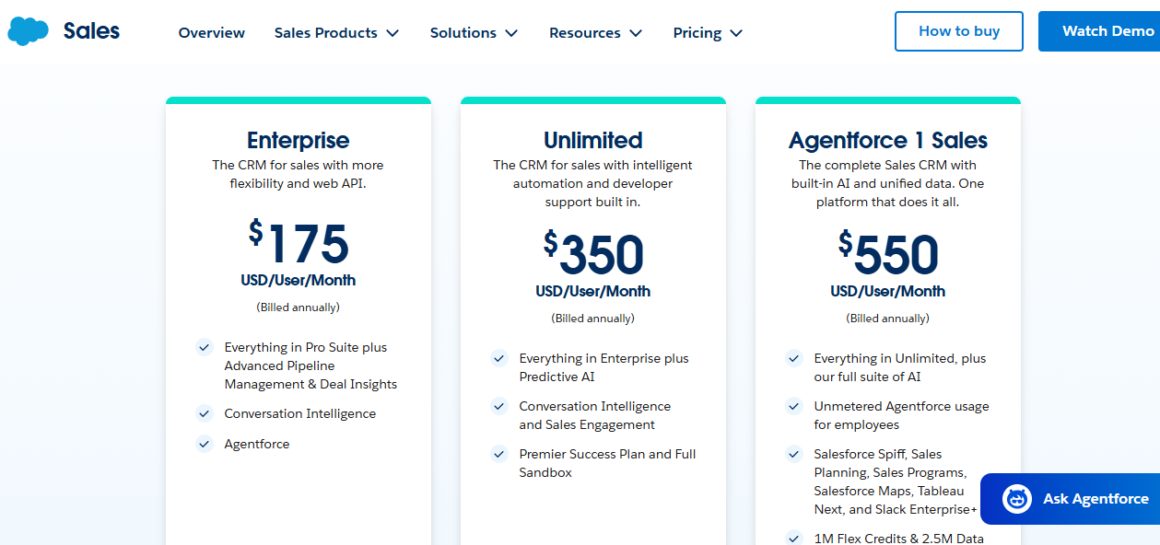
Professional edition includes only 50 custom objects compared to Enterprise’s 200, and API access requires a $25/user/month add-on that brings the total cost ($125/user/month) close to Enterprise’s base price of $175/user/month, making Enterprise the practical choice for integration-heavy organizations.
This is the elegant trap. The Professional tier is priced at $100 per user per month. Add the API access needed for most meaningful integrations, including, often, the kind of integrations that allow you to push your data somewhere else, and you are at $125 per user monthly. At that point, you are nearly at the Enterprise price while getting fewer features, including fewer data export rights. The rational move, financially, is to upgrade. Which is, of course, the point.
The 48-Hour Window
Even when you have earned the right to export weekly, Salesforce makes the process uncomfortable enough that you might think twice.
Once you click Download, a ZIP archive (containing a CSV file) will be downloaded to your device. Make sure to download your export within 48 hours after receiving the email notification, or you’ll lose access to the export.
Forty-eight hours. Miss the window and the files are gone. For a company with a large data footprint, this is not a casual task. File size restrictions: Each ZIP file is capped at 512MB; larger datasets are split across multiple files. A substantial org might generate dozens of these files, and until late 2025, you could download them all in a rush.
Then came the Winter ’26 release.
According to Trailhead3, Salesforce now enforces a sequential download policy for export files: Users can download only one export file at a time. A 60-second wait is required before downloading the next file. Starting a second download too soon triggers an HTTP 429 “Too Many Requests” error.
Sixty seconds between each file download. For a company with large export sets, this compounds into something genuinely punishing. The Winter ’26 update forces a choice: spend your time fighting a 60-second download timer every week, or upgrade to a modern, automated solution.
That line comes from Odaseva, a third-party backup vendor that sells solutions to exactly this problem. Which is, again, the point. Salesforce did not build a perfect native backup tool and then sell it as an upgrade. It built an imperfect one and left the gap for the partner ecosystem to fill — at additional cost to the customer.
Large Salesforce Orgs split exports into multiple 512MB files. If you have a moderate amount of data, those minutes add up to hours of active, manual monitoring. The arithmetic is not kind. Ten files at sixty seconds per file is ten minutes of clicking. Fifty files is nearly an hour. One hundred files — not unusual for a large enterprise — and you are sitting in front of your computer for the better part of an afternoon, hitting a button once a minute, hoping you do not miss the 48-hour window.
The Metadata Problem
Here is something that does not get enough attention: what the Data Export Service actually gives you.
It’s important to understand that these exports are not designed to act as backups, and the Data Export Service doesn’t include functionality to restore your data from exported files. It’s also worth noting that only the data of your org is exported, not metadata. So, key configuration elements like validation rules, automation, and custom objects won’t be included in the export file.
Read that again. The export service exports data, not metadata. If your organization has spent years building out validation rules, automation flows, custom objects, and approval processes, the infrastructure that makes Salesforce do what you need it to do- none of that is in the export. You have records, but no structure. You have answers, but no questions.
The Data Export Service creates CSV files containing the records from your Salesforce org… Restoring your org from these files is a massive, time-consuming effort. Think 8+ hours just to restore 500 records, and weeks for a full org. And if your metadata needs rebuilding, you can expect it to take significantly longer.
This is not a minor limitation. For any organization that has customized its Salesforce instance, which is most organizations that use it seriously, the export service is closer to a partial transcript than a real backup. It captures what was said but not how the conversations were organized.
No single native Salesforce tool exports a complete, relationally intact copy of your Service Cloud data. The Data Export Service gives you raw CSVs with no preserved relationships. Data Loader requires object-by-object SOQL queries. Reports cap at 100,000 rows. And none of them cleanly extract the Case → EmailMessage → ContentDocumentLink → ContentVersion hierarchy that makes Service Cloud data meaningful.
So you have a tiered export frequency based on how much you pay. The export has a narrow download window. The download process has been rate-limited since late 2025. And what you get at the end is not restorable in any practical sense without significant additional work. For full backup capability, you need to pay a third party. The Salesforce native offering, as one admin put it on a WordPress blog that circulated among the developer community, is just “Data Export 1 time per day. Now I want to export more Data again” — and the answer is always to buy more.
The API Access Wall
If the export limitation stings small and mid-market companies, the API tier wall hits technical teams hard. APIs are how modern businesses connect tools. They are the plumbing. Restricting them by tier is restricting your ability to build anything that reaches outside Salesforce.
The primary components include tiered editions (Starter to Unlimited), the number and type of users, and various add-ons. Features like advanced automation, API access, and support levels significantly influence the final cost.
API limits are another trap. Salesforce editions come with built-in API call thresholds, typically allocated per user per day. For a mid-sized enterprise using multiple integrations and third-party tools, those limits can be exhausted quickly. When exceeded, you must either throttle your usage, upgrade to a higher edition, or purchase additional API call packs — each of which adds to your cost base.
The hidden consequence of this is operational, not just financial. Hitting API limits can delay data syncing or block automated workflows, impacting everything from marketing automation to customer support response times.
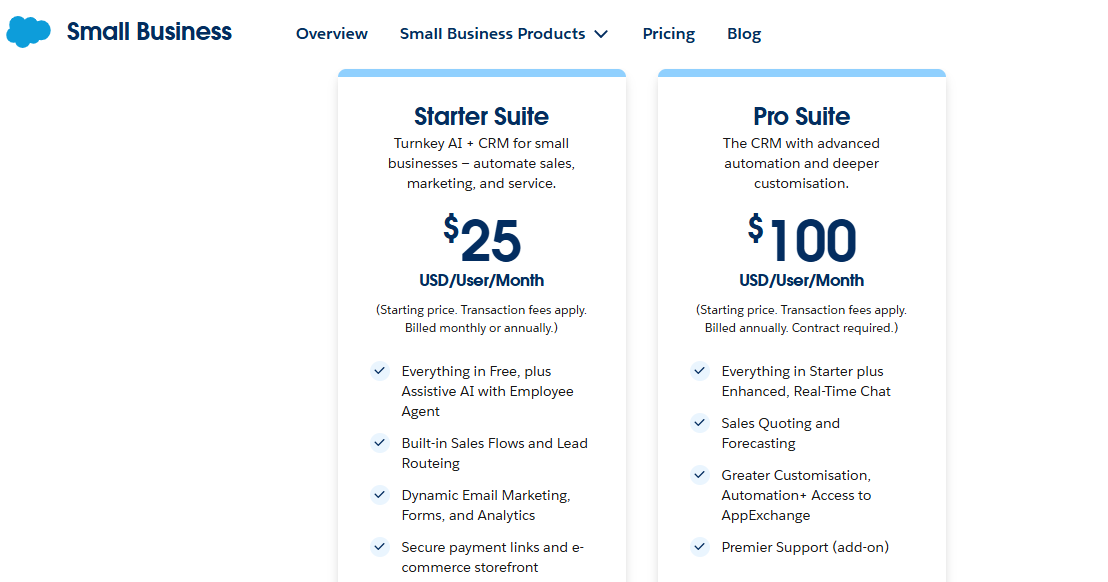
At the Starter tier, the entry-level $25 per user product, API access is not included in Starter Suite and requires a separate $25/user/month add-on, effectively increasing the tier cost from $25 to $50/user/month for integration-dependent organizations.
This means the price you see advertised, $25 per user, is the cost of Salesforce without the ability to connect it to anything else. The real entry price for a business that wants to use modern integrations is double the headline.
Paying for What You Already Paid For
The “paying twice for your own data” problem reached its most explicit expression in Salesforce’s Data Cloud product, now renamed Data 360.
Data Cloud was Salesforce’s customer data platform. A tool for unifying data across your Salesforce products and external systems. It ran on a credit-based consumption model. The remarkable thing was what consumed credits: Credits are consumed when you ingest external data, run identity resolution, create segments, activate audiences, or use AI agent grounding.
But before a pricing change in mid-2025, ingesting your own Salesforce data into Data Cloud also consumed credits. If you were an Enterprise customer paying for Sales Cloud and Service Cloud and Marketing Cloud, you still had to pay additional credits to move your data across Salesforce’s own products within the Data Cloud platform.
Free Ingestion: As of mid-2025, ingesting structured data from Salesforce applications (Sales Cloud, Service Cloud, Marketing Cloud Engagement, Marketing Cloud Personalization, and Commerce Cloud) using native connectors is free (0 credits). This removed the “paying twice for your own data” complaint.
The phrase “paying twice for your own data” appears to have been common enough in the user community that Salesforce or its analysts used it directly in documentation as a label for the problem. This is a small thing worth pausing on. When a company’s own technical documentation refers to a specific customer complaint by its colloquial name and announces that the complaint has been resolved, it tells you something about how widespread and pointed that complaint was.
According to JZ Blog4, external data sources still cost 2,000 credits per million rows in batch mode and 5,000 in streaming mode. Trustradius5 says that the starting price for Data Cloud for Marketing is $108,000 per year per organization. Six figures before you have processed a single row of external data.
The Price Increase Cycle
All of this would be easier to absorb if the base prices were stable. They are not.
On August 1, 2025, list prices will increase by an average of 6%. These increases reflect the significant ongoing innovation and customer value delivered through our products.
This was Salesforce’s6 own language in its official pricing announcement. The 2025 increase followed a 2023 increase of approximately six percent, the first list price hike in seven years. But that framing requires scrutiny.
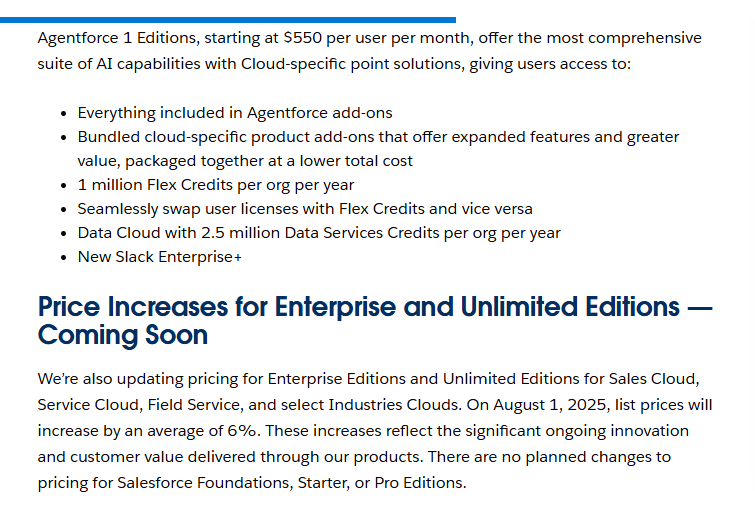
The seven-year list price freeze created the impression that Salesforce pricing was stable. In reality, the annual uplift clauses in enterprise order forms had been compounding at 7 to 10 percent per year throughout the entire freeze. When the list price increase hit in 2023, it was the visible part of a much larger cumulative cost trajectory.
So the “freeze” was somewhat nominal. Existing enterprise customers were already paying more each year. The list price increase was a second mechanism, layered on top of the first.
The 2025 price increase was analytically significant because it revealed the degree to which Salesforce was relying on price increases rather than new customer acquisition or expansion for revenue growth. Analysis of Salesforce’s7 fiscal year 2026 results showed that price increases contributed more than half of reported annual recurring revenue growth.
That number is worth sitting with. Seventy-two percent of Salesforce’s ARR growth in fiscal year 2026 came from price increases on existing customers, not from winning new ones or from expansion within existing accounts. The company is, by that analysis, primarily growing through extraction rather than acquisition.
The industry reaction was mixed, but the more vocal voices were clear. From Salesforce Ben, one of the ecosystem’s main publications, a writer put it plainly: “This is insane, the timing is awful, and it is tin-eared. I actually thought they’d be DROPPING the price, not sending it into another galaxy.”
James Kelley, Manager of Client Services at Pedowitz Group, argued that “an increase in pricing is going to push some to migrate.” As reported by CX Today8, he added:
“I doubt 70 percent of their client base is ready to implement AI, whether due to security concerns, data completeness or accuracy, processed documentation to drive AI, or several other aspects that need to enable AI within the business.”
The justification for the 2025 increase was Agentforce, Salesforce’s AI platform. Salesforce last raised its prices in August 2023, adding around 10 percent to bills across a range of products, saying the extra AI it was baking in justified the cost increases. The AI pricing itself has been famously unstable, cycling through per-conversation models, credit systems, and unlimited-seat bundles in a short window as the market pushed back on unpredictability.
Comments on some user forums have been rather negative, along with complaints that Salesforce is overly prone to mistakes and hallucinations. This appears to be backed up by Salesforce’s9 own research. Research led by one of its researchers found that LLM agents could only get a single-function task right 58 percent of the time, and that fell to 35 percent if a task needed multiple steps.
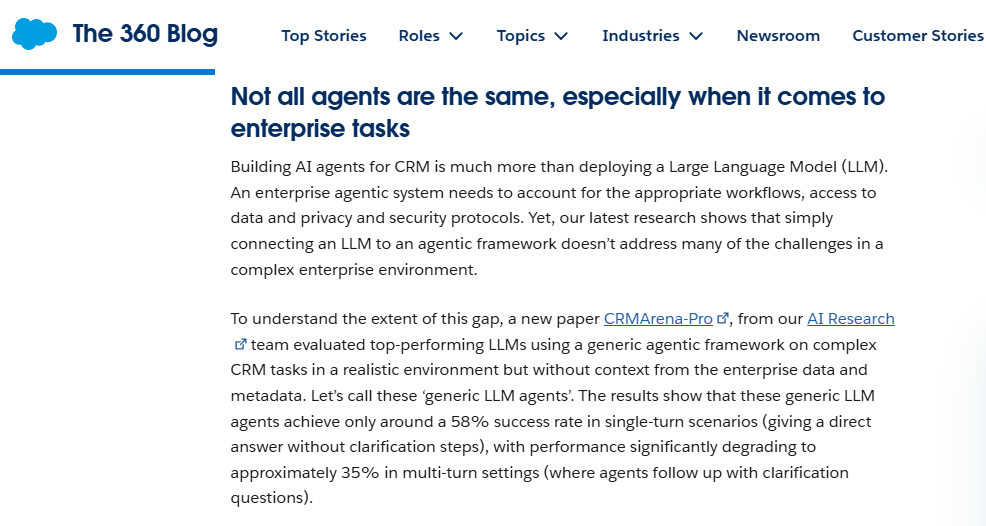
Customers are being asked to pay more for AI capabilities that Salesforce’s own researchers say succeed roughly half the time.
The Lock-In Architecture
None of this works without lock-in. And Salesforce’s lock-in is architectural, not just contractual.
From a former Salesforce employee writing on Hacker News in a thread that drew thousands of comments: “Salesforce is explicitly geared towards vendor lock-in. It’s their bread and butter. It’s why they have a vendor-specific clone of React (Lightning Web Components), a bad vendor-specific clone of Java (Apex), a bad vendor-specific clone of SQL, and a faux-development ecosystem that requires you to use their bespoke custom tools and their bespoke custom languages and frameworks. They talk about ‘the Salesforce economy’, about how they ‘create jobs’ for people who build stuff in those Salesforce-specific DSLs. Meanwhile, their entire sales department hard-sells people on ‘just put your data all into Salesforce and you can run your entire company through Salesforce!’ Every piece of tech they build is part of something that resembles a cross between a marketing funnel and a sucking black hole.”
This is blunt, but it maps to the structural reality. When a business has built its sales operations in Apex, its automations in Salesforce Flow, its customer portal in Lightning Web Components, and its data model in custom Salesforce objects, the cost of leaving is not just the cost of a new software license. It is the cost of rebuilding years of work in a different system. That cost makes the price increase math look different. A 6 percent annual increase on a $500,000 Salesforce contract is $30,000. The cost of migrating away from Salesforce is, for most enterprises, several multiples of that.
Unanticipated cloud-migration spend added 14% in 2024, which shows how hidden exit costs appear late and hit after the delivery decision is already made.
The data access fees are not separate from this dynamic. They are part of it. When your data export is tied to a monthly cadence unless you upgrade, when your API access requires an add-on, when your backup requires a third-party vendor, and when your metadata is not included in the export at all. The practical ability to leave the platform diminishes with each passing year, each new customization, each new record added to the system.
What the Costs Actually Look Like
Let me put some numbers together, because the individual pieces are easy to rationalize and the totals are harder to ignore.
Total cost of ownership typically runs 2-3x the initial license quote when accounting for customization, integrations, and training.
For a mid-market company on Enterprise Edition with 50 users, the license cost alone runs roughly $175 per user per month, or $105,000 per year. Add the Premier Support plan, widely considered necessary for anything beyond basic usage, and that adds, as reported by Eesel10, 30 percent of net license fees, bringing the total to around $136,500 annually before a single integration, add-on, or storage overage.
Key hidden costs include advanced AI features, comprehensive knowledge management, digital engagement add-ons, implementation services from certified consultants, and opting for premium support plans like the Premier Success Plan.
Independent consultant fees typically range between $500 and $900 per day. In practice, Salesforce integration can cost anywhere from $5,000 for a small setup to $50,000 per year for a mid-sized sales team.
And those integration costs circle back to the data access question. Integration requires API access, API access has limits, hitting those limits means upgrade or throttle, and the alternative to throttling is to buy more. The system is self-reinforcing in a specific direction: upward.
For Data Cloud, the numbers become genuinely extraordinary for smaller companies. Data Cloud for Marketing starts at $108,000 per year per org. According to G211, the credit pricing for consumption, with consumption credits at $500 per 100,000 credits, means that heavy usage compounds the cost further. One G2 reviewer captured the most common frustration:
“I think the pricing can be more clear. People can’t easily understand how much they will need to pay for the services.”
Opacity is itself a form of lock-in. If you cannot predict what your Salesforce bill will be in six months, you cannot build a realistic case for switching platforms. The uncertainty of leaving a known (if expensive and complicated) system for an unknown one becomes a reason to stay.
The Regulatory Context
There is a broader conversation happening around this, and it matters. According to Salesforce12, the European Union’s Data Act, which came into force in September 2023, includes provisions around data portability and cloud switching designed specifically to address vendor lock-in. The legislation aims to make it easier to switch between cloud providers by requiring interoperability and limiting the use of switching costs as a retention mechanism.
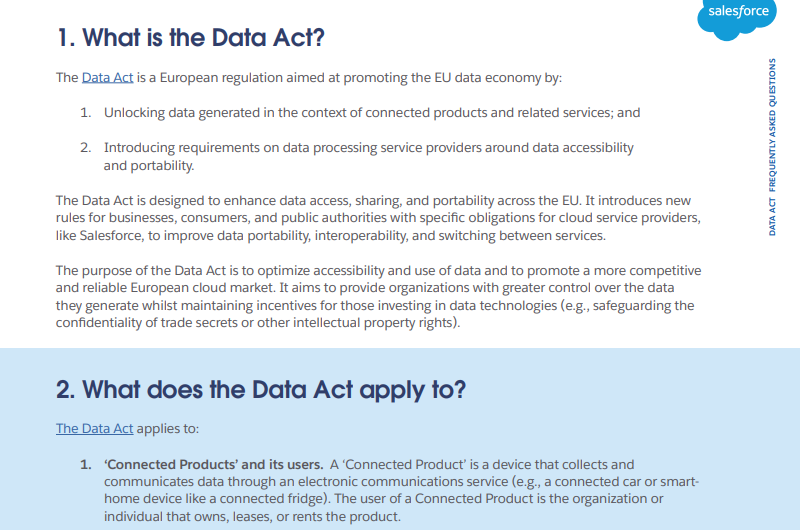
Salesforce, like most major SaaS vendors, has published FAQs addressing the Data Act. The company frames its position around customer data protection and the principle that customers own their data. The gap between that framing and the practical difficulty of extracting that data without paying for higher tiers is not addressed.
SaaStr13 reported that SaaS inflation is running at approximately four times the rate of general inflation, with businesses spending an average of $8,700 per employee on SaaS annually, a 27 percent year-over-year increase. Salesforce is not alone in this trend. Microsoft, Google, Atlassian, and Zoom have all implemented significant price increases in 2025. But Salesforce’s data access gating is more structural than most of its peers’ pricing moves. It does not just cost more to use the product; it costs more to get your data out of it.
The Workaround Economy
One of the reliable signs that a platform’s native functionality falls short is the flourishing ecosystem that grows up to compensate. Salesforce has one of the most active third-party ecosystems in enterprise software. A fact the company celebrates as the “Salesforce economy.” It is worth asking what portion of that economy exists because Salesforce’s own tools are deliberately limited.
Gearset, Odaseva, Spanning, Copado, Flosum, SysCloud: these are some of the companies that have built businesses specifically around the gap between what Salesforce’s native backup and export tools provide and what organizations actually need. Each of them has a pricing tier of its own. Each of them represents an additional line item in the total Salesforce cost of ownership.
As per Syscloud14, more than 30 percent of businesses still use Data Export or a similar tool to back up their Salesforce orgs. That means roughly 70 percent have already concluded that the native export is insufficient and bought something else. Not because the problem is technically unsolvable. It is not. Because solving it natively would mean giving away a revenue stream that the third-party ecosystem currently captures, often with Salesforce’s implicit endorsement.
The Winter ’26 change to sequential downloading with a 60-second wait between files makes this dynamic explicit. The restriction applies only to manual downloads performed through Setup → Data Export. It does not affect API-based tools, Data Loader, XL-Connector, command-line scripts, or any automated integrations. This is a UI-only safeguard, not a platform-wide limit.
So if you have the technical resources to use API tools or the budget to buy a third-party solution, you are unaffected. If you are a small business or a non-technical admin relying on the built-in interface, which is precisely who the “basic” tier is marketed to, you are the one sitting there clicking a button every sixty seconds.
What This Costs in Real Terms
The most honest way to frame all of this is not as malice but as a structural outcome of how the incentives are arranged. Salesforce has shareholders, and it has pricing power, and it has been exercising both. The decision to tier export frequency, gate API access, rate-limit downloads, and build a complex credit system for data processing are all individually defensible as engineering or business decisions. Taken together, they describe a platform where the cost of accessing your own data tracks almost perfectly with how much you pay for the privilege of storing it there.
The former Salesforce employee on Hacker News15 put it more sharply than any analyst report: the platform resembles “a cross between a marketing funnel and a sucking black hole.” That is unkind, but it contains something true. The data flows in easily. It flows out based on how much you are paying.
Analysis reveals how crucial pricing has become to Salesforce’s growth story. When the majority of your growth comes from charging existing customers more rather than winning new ones, you are relying on them to stay. And the surest way to ensure they stay is to make leaving expensive.
The data export restrictions do exactly that. Not through any single rule, but through accumulation. The monthly cadence for Professional users. The 48-hour download window. The 60-second sequential wait. The metadata exclusion. The API add-on. The credit model for data activation. Each one is a minor friction. Together they are a wall.
A wall, specifically, around data you generated, structured, and stored. Data about your customers, your deals, your service interactions. Data that would have existed in a spreadsheet or a filing cabinet before Salesforce came along and offered to organize it more efficiently. The efficiency came at a price that was not in the original contract.
The bill arrives when you want to leave.
- “Salesforce Help” help.salesforce.com/s/articleView?id=000383962&language=en_US&type=1. Accessed 9 July 2026. ↩︎
- “Salesforce Sales Pricing” Salesforce IN, www.salesforce.com/in/sales/pricing/. Accessed 9 July 2026. ↩︎
- “Feed Item Detail” Salesforce Trailblazer Community, trailhead.salesforce.com/trailblazer-community/feed/0D5KX00000gSmXv. Accessed 9 July 2026. ↩︎
- Zaa, Jitendra. “Salesforce Data 360 Credit Optimization Guide | 2026” Jitendra Zaa’s Blog, 13 Mar. 2026, www.jitendrazaa.com/blog/salesforce/salesforce-data-360-credit-optimization-guide-march-2026/. Accessed 10 July 2026. ↩︎
- Trustradius, www.trustradius.com/compare-products/salesforce-data-cloud. Accessed 10 July 2026. ↩︎
- “Updated Product Packaging and Pricing Offer New AI Capabilities and More Ways to Scale AI Throughout Every Organization” Salesforce, 17 June 2025, www.salesforce.com/in/news/stories/pricing-update-2025/. Accessed 10 July 2026. ↩︎
- “Salesforce Delivers Record Fourth Quarter Fiscal 2026 Results” Salesforce, 25 Feb. 2026, www.salesforce.com/news/press-releases/2026/02/25/fy26-q4-earnings/. Accessed 10 July 2026. ↩︎
- March, Floyd. “Salesforce Hikes Its Prices, Aims to Mitigate High AI Integration Costs” CX Today, 18 June 2025, www.cxtoday.com/crm/salesforce-prices-set-to-sore-again/. Accessed 10 July 2026. ↩︎
- Asseo, Itai. “Why Generic LLM Agents Fall Short in Enterprise Environments” Salesforce, 10 July 2025, www.salesforce.com/blog/why-generic-llm-agents-fall-short/. Accessed 10 July 2026. ↩︎
- Pangan, Kenneth. “A guide to the Salesforce pricing calculator: What you’ll really pay in 2025” Eesel AI, 24 Nov. 2025, www.eesel.ai/blog/salesforce-pricing-calculator. Accessed 10 July 2026. ↩︎
- “G2.Com” g2.com/products/salesforce-data-360-formerly-data-cloud/reviews. Accessed 10 July 2026. ↩︎
- 16 Sept. 2025, www.salesforce.com/en-us/wp-content/uploads/sites/4/documents/legal/Agreements/www.salesforce.com/en-us/wp-content/uploads/sites/4/documents/legal/Agreements/data-act-faq.pdf. Accessed 10 July 2026. ↩︎
- Lemkin, Jason. “Salesforce, Microsoft, Google and Atlassian All Raise Prices Again in 2025. Hooray.” SaaStrAI, 30 June 2025, www.saastr.com/salesforce-microsoft-google-and-atlassian-all-raise-prices-again-in-2025-hooray/. Accessed 10 July 2026. ↩︎
- “Salesforce Backup: A Complete Guide for IT Admins” Https://Www.Syscloud.Com/, 16 May 2022, www.syscloud.com/saas-data-protection-center/salesforce/salesforce-backup/. Accessed 10 July 2026. ↩︎
- “As someone who has worked at Salesforce (and is on the way out): no thanks. Sale…” Hacker News, news.ycombinator.com/item?id=31940283. Accessed 10 July 2026. ↩︎