


There is a particular kind of dread that strikes cloud engineers on a Monday morning. It comes not from a pager going off at 3 a.m. or a production server failing. It comes from opening your inbox and finding an email from Microsoft Azure informing you that your daily spending doubled last Friday, two days ago, while you were nowhere near a computer. By the time the words register, the money is already gone.
- What the System Actually Does
- Setting It Up
- The Delay Problem
- What Triggers a Spike in the First Place
- The September 2025 Wake-Up Call
- The Hard Limits That Engineers Hit
- Building a Response Workflow
- Azure vs. the Competition
- The Third-Party Tool Question
- What Good Looks Like
- The Alert Versus the Actual Problem
This is the fundamental problem sitting at the heart of Azure’s cost anomaly alert system. It is a genuinely smart tool, built on serious machine learning research, and for many organizations, it works well enough. But for others, particularly those running fast-moving production workloads or managing dozens of subscriptions across enterprise teams, the native alerting system carries structural limitations that can cost real money before anyone gets a single notification. Understanding those limits and knowing how to build around them has become one of the more practical skills in modern cloud operations.
What the System Actually Does
Budget alerts tell you when spending crosses a predetermined threshold. Anomaly alerts tell you when spending does something unexpected. The difference matters. A budget alert fires when you hit $4,000 of your $5,000 monthly budget, but it does not tell you if your daily spending suddenly doubled from $150 to $300 because someone accidentally deployed 20 VMs in a premium tier. Anomaly alerts catch those kinds of surprises by using machine learning to learn your normal spending patterns and flag deviations.
According to Microsoft1, the anomaly detection model is a univariate time-series, unsupervised prediction, and reconstruction-based model that uses 60 days of historical usage for training, then forecasts expected usage for the day. Anomaly detection forecasting uses a deep learning algorithm called WaveNet. The total normalized usage is determined to be anomalous if it falls outside the expected range based on a predetermined confidence interval.
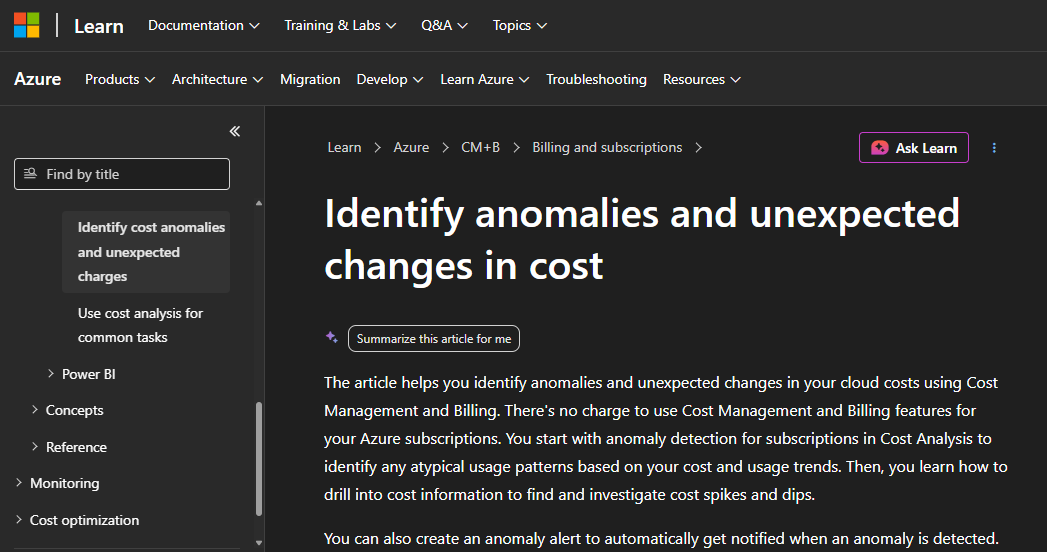
WaveNet is notable because it was originally developed by DeepMind, the AI research arm of Google, for audio synthesis, generating realistic speech and music by predicting waveforms sample by sample. Microsoft adapted the underlying architecture for a completely different domain: time-series cost forecasting. It is a technically ambitious choice, and it is worth pausing on that for a moment, because it tells you something about how seriously Microsoft takes the anomaly detection problem. They are not running a simple moving average or a basic threshold comparison. They built something considerably more sophisticated.
This system identifies unusual spending patterns daily by analyzing your normalized usage rather than just rated usage. This is a critical distinction for FinOps teams because it filters out the noise of price fluctuations to focus specifically on actual resource consumption changes.
That distinction matters more than it might seem. Azure pricing changes. Reserved instance rates fluctuate. A spike in your dollar cost does not always mean you consumed more. It might just mean a price change. By normalizing to usage volume rather than dollar cost, the model tries to flag actual behavioral changes in your infrastructure rather than reacting to market price movements.
The detection is fully automated. You do not need to define baselines or thresholds. Anomaly detection runs daily and evaluates the most recent spending data. It typically detects anomalies with a 1-2 day delay because it needs the complete cost data for a day before it can compare against the model.
Setting It Up
The setup process is genuinely simple, and that is worth acknowledging. Cost Alerts are an automated way of tracking Cost Anomalies and Reservation Utilization. Select Anomaly as the Alert type, give the alert a Subject of your choice, and select which Recipients should receive the alert. Set other values if required, then click Create. You will now receive Cost Anomaly reports automatically.
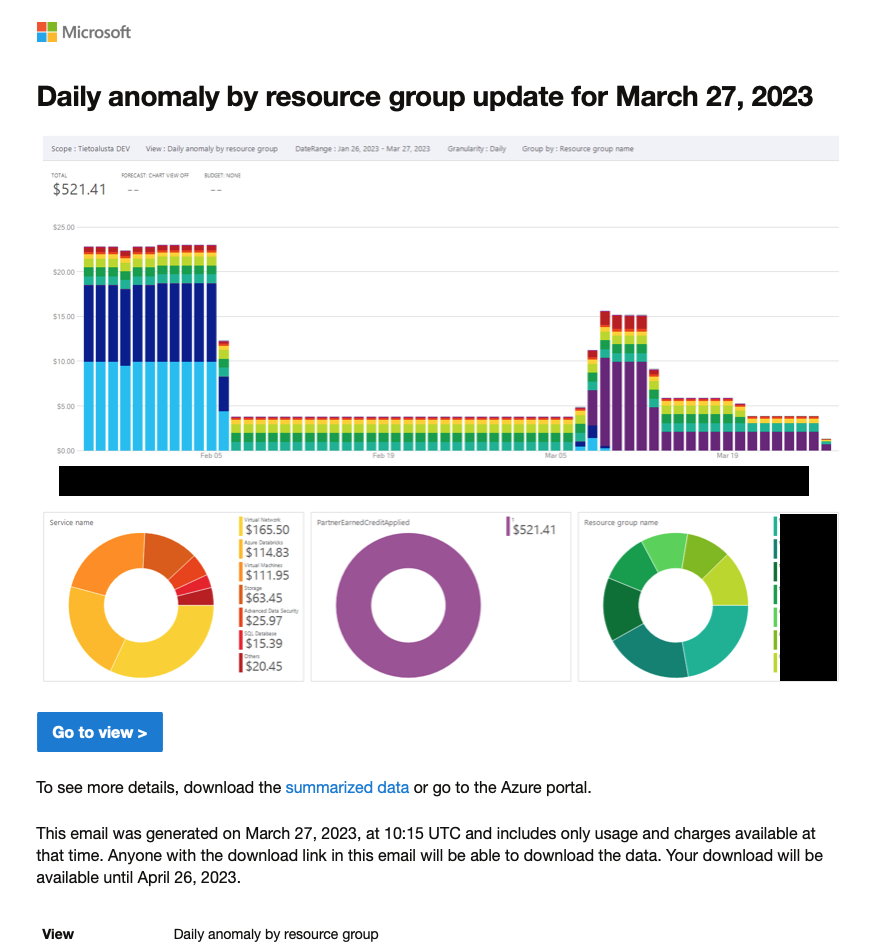
An anomaly alert email includes a summary of changes in resource group count and cost. It also includes the top resource group changes for the day compared to the previous 60 days.
There are some important constraints to know upfront. Anomaly alert rules can only be created at the subscription scope. Verify that you have the Owner, Contributor, or Cost Management Contributor role on the subscription. If you get an error message indicating that you reached the limit of five alerts per subscription, consider editing an existing anomaly alert rule.
Five alerts per subscription. That limit causes real friction for engineering teams at scale. If you are managing a large environment with dozens of subscriptions across multiple business units, you need to think carefully about how you distribute those five slots. Do you give them all to engineers? Split them with the finance team? Assign one to an automated workflow? The limit is not arbitrary. It prevents abuse of the alerting system. But it forces choices that smaller-scale infrastructure does not.
Anomaly alerts are currently available only in the Azure public cloud. If you are using a government cloud or any of the sovereign clouds, this service is not yet available.
That sovereign cloud exclusion is a significant gap for defense contractors, government agencies, and any organization subject to data residency requirements that push them toward Azure Government. Those users must rely entirely on budget threshold alerts or build custom detection pipelines, getting none of the machine learning benefits the public cloud customers have access to.
The Delay Problem
Here is the part that most documentation buries. According to Costimizer2, the biggest limitation is the delay. Alerts can take 36 to 72 hours, so some damage may already be done before you get notified.
Anomaly detection runs 36 hours after the end of the day (UTC) to ensure a complete data set is available.
So walk through the arithmetic. A runaway script starts burning through compute at 6 a.m. on a Tuesday. Azure needs the full day’s billing data before it can run the model, which means waiting until midnight UTC for Tuesday’s data to close out. Then the system waits another 36 hours to process it. By the time you receive an email alert, it is early Thursday morning. The script has been running for 48-plus hours. Depending on your workload, that can be hundreds or thousands of dollars gone before anyone even opens the notification.
According to Azure Critical Cloud3, for Enterprise Agreement and Microsoft Customer Agreement accounts, there is typically an 8-24-hour delay, while pay-as-you-go subscriptions may experience delays of up to 72 hours. This lag is especially important to consider during periods of rapid scaling.
Azure billing data is not real-time. Costs for a given hour typically appear in Cost Management 8-24 hours later. Daily data can lag by up to 72 hours at month boundaries. This means that by the time a chart shows a spike, the resource responsible for it has already been running and billing for a significant window.
Cloud billing data from providers can be delayed by up to 36 hours from the time a cost event occurs. For short-duration anomalies, this means the event may already be over by the time any alert fires.
That last point is particularly painful. If a batch job spun up, ran hard for six hours, and then terminated, the kind of thing that happens constantly in data engineering and ML training workflows, there may be nothing left to investigate by the time the alert arrives. You will know something went wrong. You will not be able to stop it. You can only try to understand it and prevent the next one.
Here’s the pattern as pointed out by Cloudaware4: a forgotten POC, a misconfigured AKS dev cluster, or a new data pipeline quietly doubles daily costs, and nobody notices until Finance closes the month.
This is the cloud equivalent of finding the gas burner still on when you get home. The damage is already done.
What Triggers a Spike in the First Place
Before you can respond well to anomaly alerts, it helps to understand what causes cost spikes in Azure environments. The causes cluster around a few familiar patterns.
Orphaned resources are the most common culprit. Common culprits often include orphaned resources, such as unattached Managed Disks or idle Load Balancers that continue to accrue charges after a Virtual Machine has been deleted. A VM gets deleted, but the associated managed disk, public IP address, and load balancer keep billing. Nobody set up cleanup automation. The cost is small enough per resource that it does not trigger a budget alert, but the anomaly detection model notices the pattern change.
Runaway automation is the second big category. A data pipeline enters an infinite retry loop on a Saturday afternoon. An Azure Function gets called in a tight cycle due to a misconfigured trigger. A Kubernetes cluster autoscales aggressively during a traffic spike, and nobody set a node count ceiling. These events move fast, and the costs compound quickly.
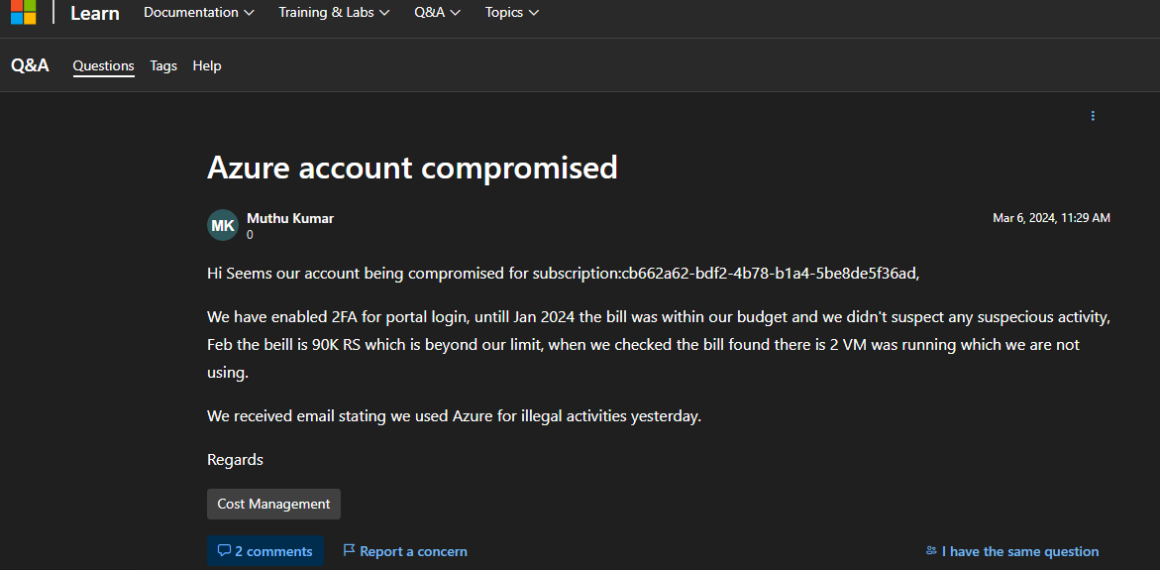
Security incidents are rarer but more serious. From Microsoft’s5 own documentation, we can see that one Azure account was compromised, and the bill went from within-budget amounts to 90,000 rupees in a single month. When checked, two VMs were running that the owner had never deployed. Crypto-mining is the most common use of compromised cloud accounts, and it is perfectly designed to avoid naive budget alerts. The attacker wants to stay under the threshold for as long as possible while maximizing compute usage. Anomaly detection has a better shot at catching this because it looks at the pattern, not just the absolute number.
The FinOps Foundation6 estimates that organizations without a tagging strategy misattribute or cannot attribute 20-40% of cloud spend. Cloud cost anomalies like a Lambda function in a runaway loop, or a forgotten dev environment left running over a long weekend, are common and expensive. The question is not whether they will happen, but how quickly they are caught.
The September 2025 Wake-Up Call
No investigation of Azure cost alerting can skip what happened in September 2025. It was a vivid demonstration of how the alerting infrastructure, when it misfires, can cause as much panic as a real cost spike.
According to The Register7, some Microsoft Azure customers had a worrying few days after a problematic account migration caused forecast costs for the cloud service to skyrocket, triggering budget alerts. An alarmed Register reader got in touch after receiving warnings from Azure’s automated systems that they had significantly exceeded their budgets, and a glance at Microsoft’s support forums indicates their issue was not isolated. The problem was that costs had suddenly ramped up. One user, with a budget threshold of $85, received an automated alert indicating that their spend was forecast to reach $1,027. Another said,
“We’re actively seeing the same issue; costs have blown up by a crazy amount. No official notice or announcement from Microsoft either, it’s appalling.”
Suggestions from Microsoft that users should contact the support team did little to assuage concerns. A user said:
“AND I CANNOT CONTACT THE SUPPORT ANYHOW… Just automated ‘do this, do that’.”
According to messages seen by The Register, troubles appeared to have stemmed from accounts being migrated from the Microsoft Online Subscription Program (MOSP) to the Microsoft Customer Agreement (MCA). The transition triggered incorrect cost calculations and, in some cases, resulted in retroactive charges affecting multiple customers.
Think about what that means from an engineering perspective. You receive an email telling you your cloud spend is about to be twelve times your budget. Your heart rate goes up. You start making phone calls. You cancel weekend plans. You post in the internal Slack channel. And then, eventually, you learn it was a false alarm caused by a billing system migration you were never told about.
Microsoft swiftly acknowledged the issue, deploying fixes within hours and issuing credits to mitigate any perceived financial harm. However, the incident exposed vulnerabilities in Azure’s migration protocols, raising questions about the robustness of automated processes in handling large-scale account transitions.
The incident laid bare a structural problem. An alerting system is only valuable if people trust it. False positives erode that trust. Engineers who get burned by a false alarm become slower to respond to real ones. They hesitate, they double-check, they assume it might be another platform glitch. That hesitation has a real cost when the next alert is genuine.
The Hard Limits That Engineers Hit
Beyond the delay and the false alarm risks, there are several structural constraints that practitioners run into regularly.
No custom sensitivity tuning. You cannot adjust how sensitive the anomaly detection is. It uses Azure’s built-in model. This is a notable gap compared to AWS’s8 Cost Anomaly Detection, which allows you to set absolute dollar thresholds or percentage thresholds for what counts as an anomaly worth alerting on. Azure gives you no such dial. The model decides what is anomalous, and you accept its judgment, or you ignore the alert. False positives occur when expected business growth triggers mathematical alerts. That is good advice in theory, but it requires significant engineering investment that many teams cannot make.
Subscription scope only. The automated alerts are primarily tied to the Subscription scope. If you want highly granular anomaly tracking for a specific microservice or a single product feature, the native setup becomes difficult to manage at scale. This is a genuine architectural constraint. Large organizations want to know not just that Subscription A had an anomaly, but which team’s workload caused it, which microservice, which environment. The native alerting cannot tell you that without significant manual investigation after the fact.
Email notifications only, natively. For other channels, you need to build custom integrations. In 2026, most engineering teams do not live in email. They live in Slack, in PagerDuty, in Microsoft Teams. Getting anomaly alerts routed to those channels requires building Logic Apps integrations or webhook pipelines. It is not impossible. It is well-documented. But it adds operational complexity that many smaller teams cannot absorb.
The learning period problem. The model needs historical data to establish baselines. New subscriptions may not get accurate anomaly detection for the first few weeks. This creates a blind spot precisely when it is most dangerous, when a subscription is new, and engineers are still learning what “normal” looks like. The irony is that new environments are also the most likely to have misconfigurations and runaway costs.
A thread on Microsoft’s own Q&A forums9 captures the frustration well. One engineer, Janne Kujanpaa, set up anomaly cost alerts across all subscriptions with weekly recurrence and found that the emails showed a snapshot of costs but no explanation of the anomaly, missing the context that the documentation promised. He had done everything right by the book. The feature simply was not behaving as described. That kind of gap between documentation and reality is a recurring theme in the community around this tooling.
Building a Response Workflow
The organizations that get real value from anomaly alerts treat them as the beginning of a process, not the end of one.
The most effective configuration uses Azure Action Groups to move beyond simple email notifications. Instead of a message that might sit in an unread inbox, you can trigger automated responses that integrate directly into your existing DevOps workflows. For example, you can send notifications to a dedicated Slack channel via a Logic App or trigger a Webhook to PagerDuty for critical production spikes.
According to Microsoft10, Azure Logic Apps can monitor an Office 365 Outlook mailbox. When a new anomaly alert email is detected, Logic Apps can parse the content and trigger workflows, such as posting a notification to Microsoft Teams or Slack, running a Cost Management Query API call to gather detailed usage data, logging the anomaly into an internal FinOps dashboard, or initiating approval workflows or escalation procedures.
When an alert fires, the investigation should follow a consistent path. Azure Cost Management allows you to drill down into the Cost Analysis view to pivot by resource ID, location, or tag. By filtering for the specific day the anomaly occurred, teams can identify exactly which resource or service drove the deviation.
Anomalies should be classified by severity, typically across a low, medium, high, and critical scale, so that response workflows are proportionate. A 3% cost increase in a low-traffic service does not warrant the same response as a 200% spike in a production database. Importantly, a low-severity anomaly can escalate to critical as costs accumulate over hours and days if it is left unaddressed. A daily alert that looks minor in isolation may represent thousands of dollars of waste by the end of the week.
This is the counterintuitive lesson that experienced FinOps practitioners have learned: the most dangerous anomalies are not always the ones that look dramatic on day one. A modest 15% daily overspend, compounding for two weeks without being addressed, can become a larger incident than a single-day spike that gets caught and remediated quickly.
Wire alerts for daily spend, not just month-end. That way, the spike shows up in your channel while it’s still small enough to fix.
Azure vs. the Competition
It is worth situating Azure’s native anomaly detection within the broader landscape of cloud cost monitoring, because the differences are instructive.
According to ZopDev11, AWS Cost Anomaly Detection runs once per day, not in real time. A spike that starts at 2 a.m. will appear in an alert by the following morning at the latest. For same-day detection, you need CloudWatch billing alarms as a complement. Neither GCP nor Azure matches AWS Cost Anomaly Detection for out-of-the-box ML-based anomaly alerting. Both rely primarily on budget threshold alerts, which are different: you define a budget, and you get notified when spending reaches 50%, 90%, or 100% of it. That is not anomaly detection; it is overage notification.
When it detects a cost anomaly, Google Cloud flags the deviation by actual versus expected spending, ranks top contributors, and pushes alerts via email or Pub/Sub. The real differentiator is impact thresholds: you decide the minimum dollar amount for what gets flagged. That keeps false positives low without hacking around custom suppression logic.
Google’s approach of letting customers set minimum dollar thresholds is something Azure does not offer natively. It is a meaningful gap. An anomaly that adds $3 to your daily spend is not worth waking up a team for. Azure’s model might flag it anyway, because the model does not know your operational context. It only knows that the pattern changed.
Azure groups each anomaly detection event by subscription, shows the forecast versus actual, and links it directly to your alerts and budgets, so Finance, Engineering, and Product all work off the same delta. It is not just a heads-up; it is part of the same place where you set guardrails, check historical costs, and manage allocations.
That integration is a genuine strength. Azure’s anomaly detection is not a standalone product. It is woven into the same Cost Management interface where your budgets, exports, and cost analysis tools live. For organizations already deep in the Azure ecosystem, the operational convenience of having everything in one place is real.
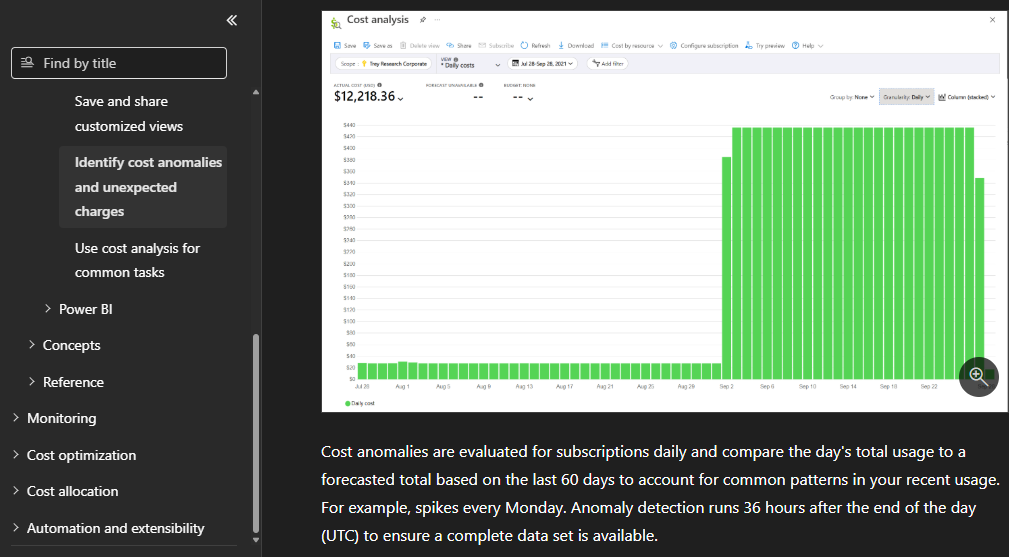
Azure Cost Anomaly Detection is built on Microsoft’s12 WaveNet forecasting models and analyzes daily cost usage trends against historical data (up to 60 days). It looks for unexpected spikes in costs for a subscription or a resource group by comparing forecasted versus actual usage. That architecture can also be provisioned and managed through Terraform, which matters to teams that treat their infrastructure as code and want their cost monitoring definitions living in the same repositories as their resource configurations.
The Third-Party Tool Question
For teams managing a handful of subscriptions with straightforward workloads, the native Azure approach, disciplined use of Cost Analysis, budget alerts, and anomaly detection emails, is workable. It is not fast, but it gets there.
But for enterprise teams managing dozens of subscriptions, MSPs handling multiple clients, or FinOps teams that need to report to non-technical stakeholders, the native tools start to show their seams.
Most Azure cost tools show you what you spent. CloudZero13 shows you why, and whether it was worth it. CloudZero maps Azure spend to the teams, products, features, and customers driving it, in real time, without complete tagging. When a cost spike happens, everyone knows exactly what caused it and who owns it. CloudZero also surfaces anomalies the moment they appear, with alerts routed directly to Slack or email, so teams can act before an incident becomes a budget problem.
It is too late to wait and get a daily report. Next-generation platforms use AI to detect cost spikes in real-time. A rogue SQL query spiking throughput by 500% in an hour can be caught at an early stage. This saves thousands of dollars compared to discovering the problem at week’s end.
The third-party FinOps market has grown substantially in the last two years, partly in response to the limitations of native cloud alerting. Tools like Turbo360, Cloudaware, Costimizer, and CloudZero all offer faster detection, more granular attribution, and better integration with DevOps workflows. The tradeoff is cost. These platforms are not free. And they add complexity. For a startup running three subscriptions, they are overkill. For a financial services firm running 200 subscriptions across three regions, they may be essential.
According to Hykell14, with Microsoft eliminating tiered volume discounts as of November 2025, enterprises are bracing for a 6% to 12% infrastructure cost uplift that makes automated detection essential.
That pricing change has made the cost monitoring conversation more urgent. When your Azure bill is growing by double digits because of a pricing restructure you cannot control, every dollar of avoidable overspend matters more. Anomaly detection has gone from a nice-to-have governance tool to something that belongs in every production environment’s operational baseline.
What Good Looks Like
After looking at the technical architecture, the community complaints, the September 2025 incident, and the comparative landscape, a practical picture emerges of what good anomaly alert hygiene actually requires.
Enable alerts on every production subscription. The cost is zero, and the value is high. There is genuinely no reason not to.
Route alerts somewhere people will see them. Email is not enough. Build the Logic App or the webhook. Route it to Slack. Assign an owner. Cost anomalies affect the whole team. Route alerts to a shared channel, not just one person.
Document expected anomalies. Before a big deployment or migration, let the team know to expect a cost spike so they do not waste time investigating a known change. This sounds basic, but it is the thing teams most consistently skip. A deployment that triples your compute spend for three days is not an anomaly. It is a planned event. If you do not record that expectation somewhere, your on-call engineer will spend two hours investigating something that was intentional.
Use tagging aggressively. When an anomaly fires and you can pivot the cost analysis view by team, environment, and application in thirty seconds, the investigation that would otherwise take a morning takes fifteen minutes.
And finally: accept the delay. You cannot engineer around the 36-to-72-hour latency of Azure’s native system without either building custom monitoring or paying for a third-party tool. Knowing this limitation exists means you can design your response workflows to account for it rather than being surprised by it every time.
The Alert Versus the Actual Problem
There is a broader observation worth making here, one that goes beyond Azure specifically.
Cost anomaly alerts are a symptom-detection system. They tell you that something unusual happened. They do not tell you whether that unusual thing matters, whether it will happen again, or whether anyone has the authority to fix it. The organizations that use anomaly detection most effectively are the ones that have already done the harder work: establishing ownership of subscriptions, tagging resources to teams, defining what acceptable spend variance looks like, and building relationships between engineering and finance so that a cost conversation does not require an emergency meeting to start.
An anomaly does not always mean a problem. A successful product launch that doubles your traffic is an anomaly by the model’s definition. It deviated significantly from the prior 60 days. If your team knows the launch happened and expected the cost increase, the alert is just noise. If nobody told the FinOps team about the launch, the alert is a useful prompt for a conversation that should have happened already.
The real value of cost anomaly alerts is not catching the runaway script you would have caught anyway at the month-end review. It is compressing the feedback loop between “something changed in production” and “someone who can do something about it knows.” Azure’s native system gets that loop down from 30 days to 2-3 days. Third-party tools can get it to hours. Neither is instantaneous.
The fire is going to start eventually. The question is whether you find out about it from the smoke or from the invoice.
Sources
- “Identify anomalies and unexpected changes in cost” Microsoft Learn, learn.microsoft.com/en-us/azure/cost-management-billing/understand/analyze-unexpected-charges. Accessed 1 June 2026. ↩︎
- “Azure Cost Anomaly Detection: How to Catch Billing Spikes Before They Hurt” costimizer.ai/blogs/azure-cost-anomaly-detection. Accessed 1 June 2026. ↩︎
- Smith, James. “Azure Cost Alerts: Monitoring Usage Automatically” Scaling with Azure for SMBs, 7 Aug. 2025, azure.criticalcloud.ai/azure-cost-alerts-monitoring-usage-automatically/. Accessed 5 June 2026. ↩︎
- Team, Cloudaware Editorial. “10 Best Practices for Azure Cloud Cost Optimization from FinOps Pros” Cloudaware, 10 Dec. 2025, cloudaware.com/blog/azure-cloud-cost-optimization/. Accessed 5 June 2026. ↩︎
- “Azure account compromised” Microsoft Q&A, learn.microsoft.com/en-us/answers/questions/1609216/azure-account-compromised. Accessed 5 June 2026. ↩︎
- “How to Optimize Cloud Usage” www.finops.org/wg/how-to-optimize-cloud-usage/. Accessed 5 June 2026. ↩︎
- Speed, Richard. “Microsoft cloud customers hit by messed-up migration” 1 Sept. 2025, www.theregister.com/off-prem/2025/09/01/microsoft-cloud-customers-hit-by-messed-up-migration/998267. Accessed 5 June 2026. ↩︎
- “Getting started with AWS Cost Anomaly Detection” AWS Cost Management, docs.aws.amazon.com/en_us/cost-management/latest/userguide/getting-started-ad.html. Accessed 5 June 2026. ↩︎
- “How anomaly cost alerts should work” Microsoft Q&A, learn.microsoft.com/en-us/answers/questions/1193514/how-anomaly-cost-alerts-should-work. Accessed 5 June 2026. ↩︎
- “Identify anomalies and unexpected changes in cost” Microsoft Q&A, learn.microsoft.com/en-us/azure/cost-management-billing/understand/analyze-unexpected-charges. Accessed 5 June 2026. ↩︎
- “Cloud Cost Anomaly Detection” ZopDev, 6 Apr. 2026, zop.dev/resources/blogs/cloud-cost-anomaly-detection/. Accessed 5 June 2026. ↩︎
- “Identify anomalies and unexpected changes in cost” Microsoft Q&A, learn.microsoft.com/en-us/azure/cost-management-billing/understand/analyze-unexpected-charges. Accessed 5 June 2026. ↩︎
- “Azure Cost Optimization: The Complete Guide (2026)” 7 Apr. 2026, www.cloudzero.com/blog/azure-cost-optimization/. Accessed 5 June 2026. ↩︎
- Ott. “How to detect and automate Azure cost anomaly alerts to stop budget leaks” Hykell, 9 Feb. 2026, hykell.com/knowledge-base/azure-cost-anomaly-detection/. Accessed 5 June 2026. ↩︎


